
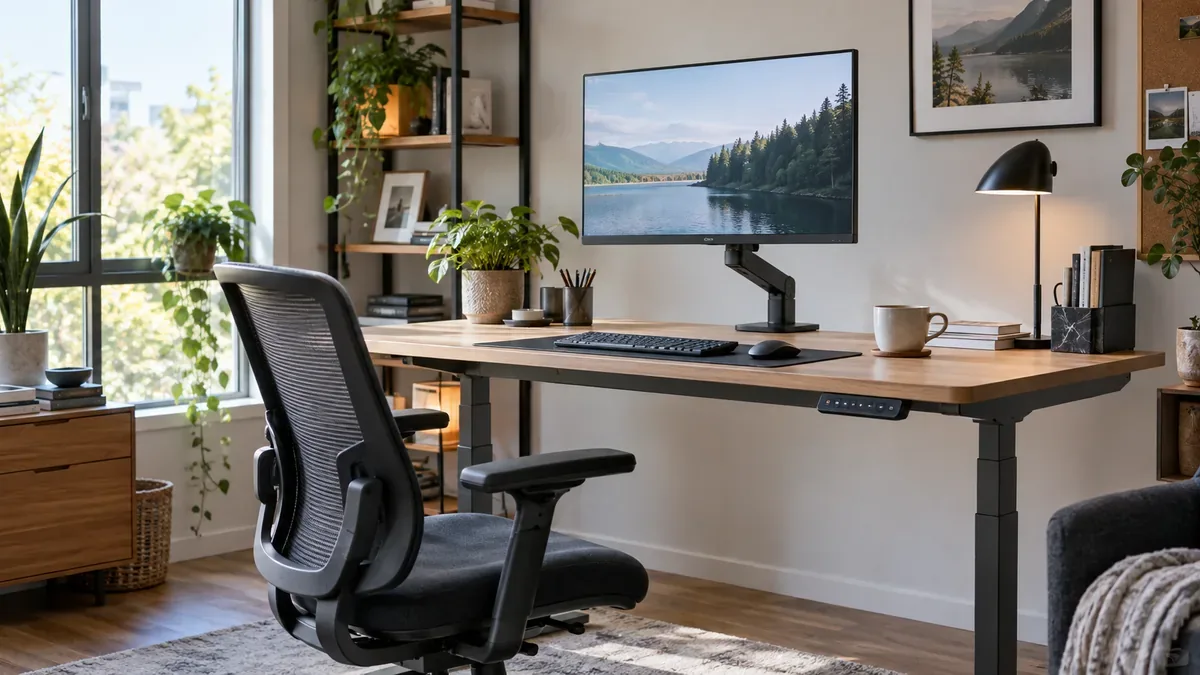
A height adjustable computer monitor desk and an ergonomic monitor stand work well as a pair. The desk changes the height of the whole work surface, while the stand allows the screen to be positioned more independently.
That extra flexibility can be useful for teenagers and students whose needs change over time, shared family workstations, and office workers who alternate between tasks or between sitting and standing.
What Is a Computer Monitor Desk?
A computer monitor desk is a desk designed or arranged to support a desktop monitor, keyboard, mouse and related equipment. A practical setup should provide enough space to keep the monitor in front of the user, the keyboard and mouse close together, and frequently used items within easy reach.
A height adjustable desk adds the ability to move the entire work surface. This can help accommodate users of different heights and support changes between seated and standing work. However, moving the whole desk also moves the keyboard, mouse and monitor together.
Why Desk Height Alone Is Not Enough
Desk height is usually set with the hands and arms in mind. The keyboard and mouse should be positioned so the user can work without repeatedly raising the shoulders or reaching forward.
The preferred keyboard height and monitor height are not always the same. Raising the desk simply to lift the screen also raises the keyboard and mouse. Lowering the desk for a more comfortable typing position may leave the monitor lower than desired. A single desk adjustment cannot set these two positions independently.
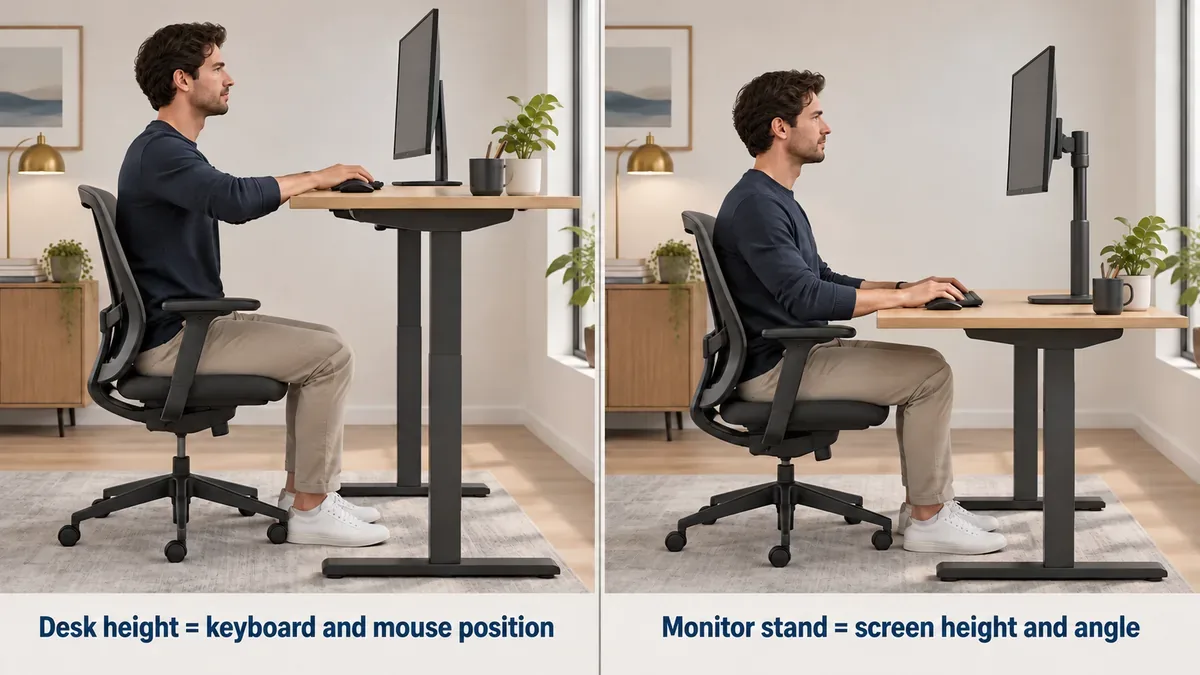
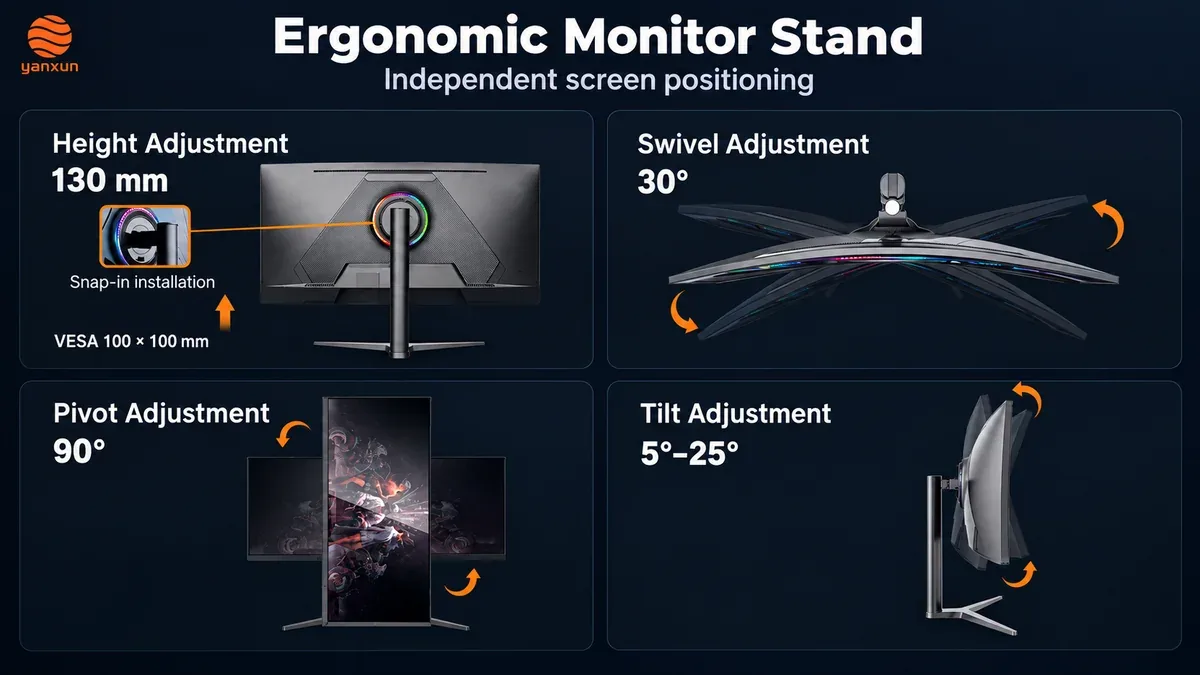
An adjustable monitor stand separates the viewing position from the working-surface position. Depending on its design, a stand may support height adjustment, tilt, swivel, pivot or screen rotation. Not every stand includes every movement, so its actual adjustment range should be checked before selection.
Desk adjustment controls the working surface. Monitor stand adjustment controls the viewing position. Together, they provide more flexibility than either adjustment alone.
Why This Setup Is Useful for Teenagers and Students
Teenagers are not static users. Their height, chair requirements, study habits and computer use may change throughout school and university. A computer monitor desk that fits well today may need to be readjusted later.
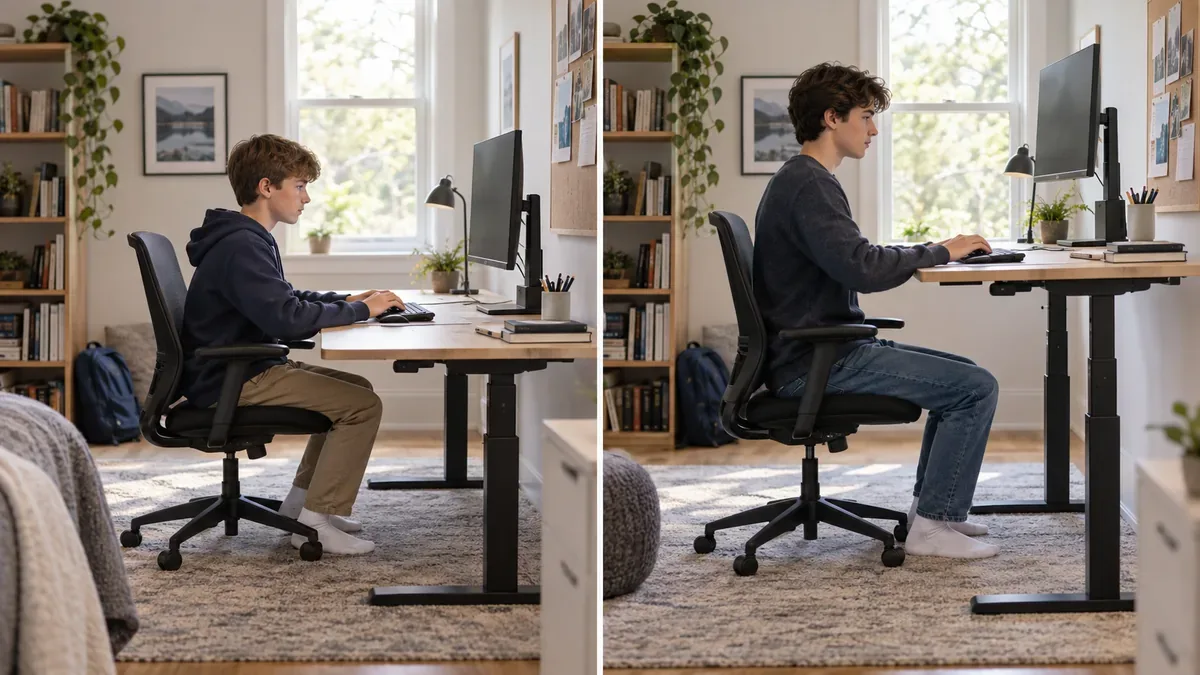
A height adjustable desk can accommodate those changes, while an adjustable monitor stand lets the screen move without unnecessarily changing keyboard height. The same flexibility is useful when siblings or other family members share one computer.
The setup should still be reviewed as a whole. Chair height, foot support, keyboard position, screen distance and monitor height all matter. “Adjustable” does not automatically mean that every setting will suit every user; the available ranges must fit the people using the workstation.
Why It Matters for Office Workers
Office workers may spend many hours at the same workstation, which can make an inconvenient screen or input-device position more noticeable. Independent desk and monitor adjustments make it easier to refine the setup for different tasks and working positions.
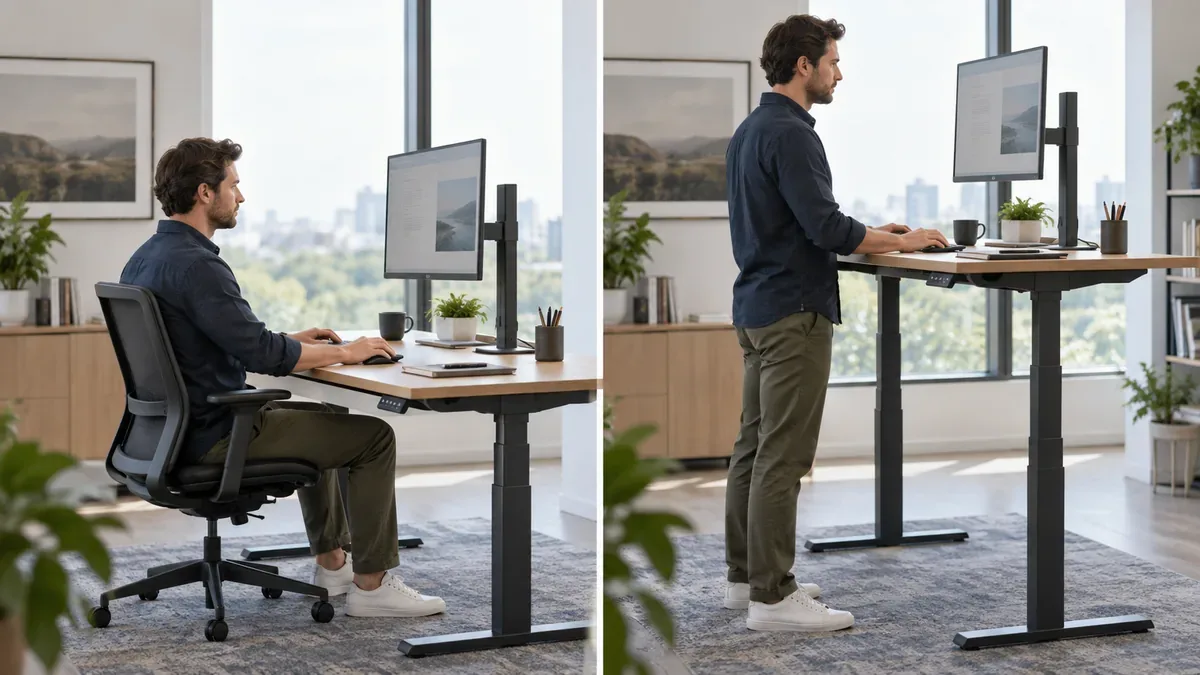
Mayo Clinic’s office ergonomics guidance recommends placing the monitor directly in front of the user, approximately an arm’s length away, with the top of the screen at or slightly below eye level. These are useful starting points rather than fixed measurements for everyone.
NIOSH office guidance also emphasizes avoiding prolonged sitting or standing and awkward postures. It notes that changes to equipment or furniture, along with periodic breaks, can help create a more suitable work environment.
The objective is therefore not to stand all day or to hold one supposedly perfect posture. It is to create an adjustable workstation that makes position changes practical.
Ergonomic Monitor Stand vs Fixed Monitor Stand
A fixed stand may be sufficient when one person uses the monitor in a stable setup and the screen can already be positioned appropriately. An ergonomic monitor stand becomes more useful when:
- Several people share the workstation.
- The desk is adjusted between sitting and standing.
- The monitor is used for long work or study sessions.
- The screen needs to be tilted, turned, raised or rotated.
- A larger 27-inch, 32-inch or 34-inch display is used.
- The workstation must support different tasks.
The word “ergonomic” alone does not guarantee a good fit. Adjustment range, stability, screen size, mounting pattern, desk depth and the user’s proportions should all be considered.
A Practical Computer Monitor Desk Setup
1. Set the Chair and Desk First
Begin with a supported seated position. Adjust the chair and desk so the feet are supported, the shoulders can remain relaxed, and the keyboard and mouse can be used without excessive reaching. If the desk is used while standing, choose a working height that keeps the input devices comfortable rather than raising the surface solely to lift the monitor.
2. Position the Monitor Independently
Place the monitor directly in front of the user, generally behind the keyboard. Approximately an arm’s length is a practical starting point. Then adjust the screen so its top is at or slightly below eye level. Screen size, eyesight, corrective lenses, text size and individual comfort may require a different final position.
3. Check Glare and Readability
NIOSH recommends positioning the display perpendicular to windows where possible or adjusting blinds to reduce glare. Appropriate brightness, contrast and text size can also reduce the need to lean toward the screen.
4. Change Position During the Day
If the desk supports sitting and standing, save or note a comfortable height for each position and readjust the monitor when necessary. Periodic breaks, movement and posture changes remain important even when the workstation is well configured.
Monitor Options With Adjustable and Ergonomic Stands
Monitor size is only one part of workstation planning. Stand design and mounting compatibility also affect how easily the display can be positioned. Yanxun Display offers several relevant configurations.
32 Inch DM Series Monitor
The 32 Inch DM Series Monitor is available with either a metal ergonomic stand or a fixed bracket. The ergonomic stand configuration supports rotation, tilt, pivot and swivel. The product page lists FHD, QHD and UHD configurations and a 100 × 100 mm VESA mounting pattern.
View the 32 Inch Ergonomic Stand Monitor
34 Inch Arcus Series Curved Monitor
The 34 Inch Arcus Series Curved Monitor combines a UWQHD VA display with a metal adjustable bracket. Its VESA mounting pattern is 75 × 75 mm.
View the 34 Inch Ergonomic Stand Curved Monitor
27 Inch DL Series Monitor
The 27 Inch DL Series Monitor is offered with FHD, QHD and UHD configurations, a plastic adjustable bracket and a 100 × 100 mm VESA mounting pattern.
View the 27 Inch Adjustable Stand Monitor
These pages describe configurable products. The panel, resolution, stand, mounting hardware and other specifications should be confirmed for the selected order. A VESA pattern identifies the mounting interface but does not by itself confirm compatibility with every third-party arm or mount; size, load rating and hardware must also match.
The Best Workstation Is One That Can Adapt
There is no single computer monitor desk height that suits every teenager, student or office worker. People use different chairs, screen sizes, viewing distances and working positions.
A height adjustable desk changes the position of the whole work surface, while an ergonomic monitor stand controls the screen more independently. Used together, they allow the workstation to adapt to different users, tasks and positions.
For teenagers, that means a setup that can be reviewed as they grow. For office workers, it means more flexibility across the working day. In both cases, the goal is to make the workstation fit the person rather than forcing the person to work around a fixed setup.
Frequently Asked Questions
Is an ergonomic monitor stand worth it?
An ergonomic monitor stand can be useful when the screen height, angle or orientation needs to change. It is especially practical for shared workstations, height adjustable desks and setups used for several different tasks. Its value depends on whether its adjustment range suits the monitor and user.
What height should a computer monitor be on a desk?
A common starting point is to place the top of the monitor at or slightly below eye level, with the screen approximately an arm’s length away. The final position should account for screen size, eyesight, corrective lenses and individual comfort.
Do I need an ergonomic monitor stand with a standing desk?
It is not essential in every setup, but it can be useful. Desk height determines the position of the keyboard and mouse, while an adjustable monitor stand allows the display height and angle to be changed separately.
Are adjustable computer desks suitable for teenagers?
An adjustable desk can accommodate users of different heights and can be readjusted as a teenager grows. The chair, foot support, keyboard, mouse, monitor and desk should still be configured together rather than relying on desk height alone.
Sources and Further Reading
- Mayo Clinic: Office Ergonomics—Your How-To Guide
- NIOSH: Working From Home—How to Optimize Your Work Environment and Stay Healthy
- NIOSH: Office Environments and Your Safety
This article provides general workstation setup information and is not medical advice.