
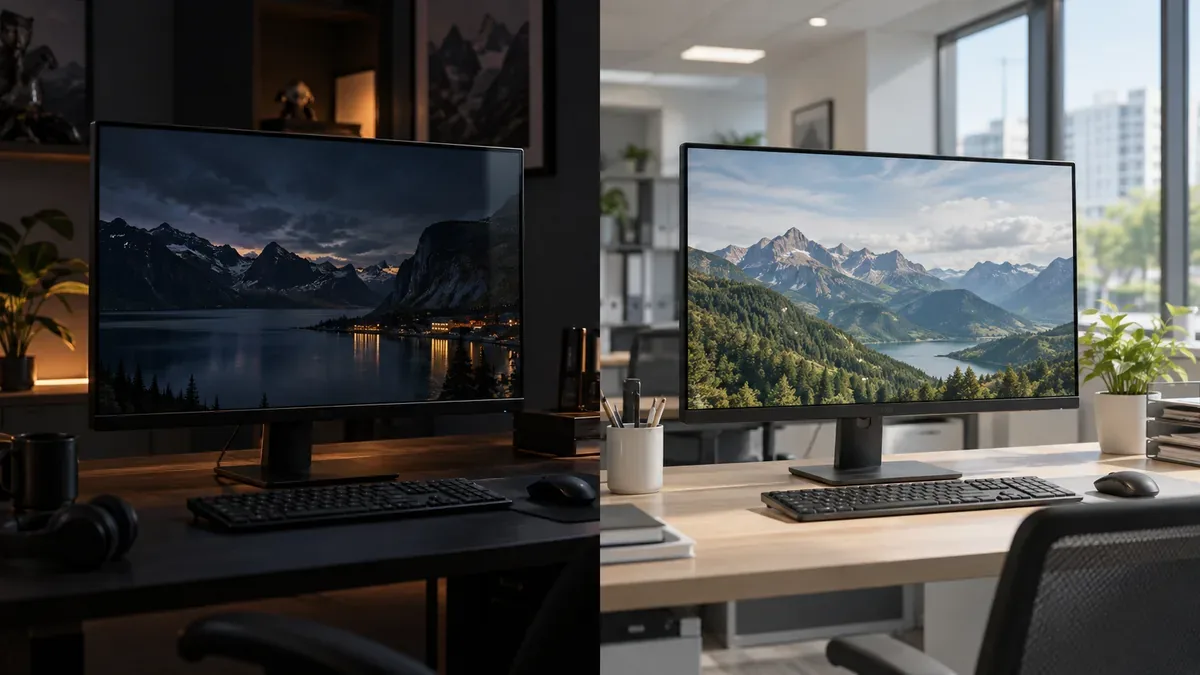
A glossy monitor generally offers higher perceived clarity and more vivid looking images when room lighting is controlled. A matte monitor is usually easier to use where windows, ceiling lights, and lamps would otherwise create distracting reflections.
Neither finish is automatically better. The important difference is not resolution or refresh rate, but how the screen surface manages light from the room. Your environment, daily tasks, and tolerance for reflections should guide the decision.
Glossy vs Matte Monitor at a Glance
| Factor | Glossy monitor | Matte monitor |
|---|---|---|
| Reflections | Sharper and more mirror like | Softer and more diffused |
| Perceived image clarity | Often appears very clean and direct | May show slight surface haze |
| Color appearance | Can look especially vivid | Can look slightly softer |
| Black appearance | Attractive in controlled lighting | Often more consistent in brighter rooms |
| Text clarity | Fine edges may appear very crisp | Strong coatings can slightly soften perceived edges |
| Bright room performance | Defined reflections may be distracting | Usually more practical |
| Dark room performance | Often excellent | Also good, with less reflection risk |
| Office use | Best with controlled lighting | Usually the more versatile choice |
| Gaming | Strong visual impact in a controlled room | Useful when lighting changes |
| Photo and video work | Suitable in a controlled studio | Practical in a bright or shared studio |
| Fingerprints | Usually easy to see | Often less visually obvious |
| Dust visibility | Can be emphasized by reflections | Often less distracting, but still present |
| Cleaning | Streaks can be easy to notice | Texture may require careful cleaning |
| Typical use case | Controlled entertainment or creative space | Office, school, shop, and general use |
What Is the Real Difference Between Glossy and Matte Screens?
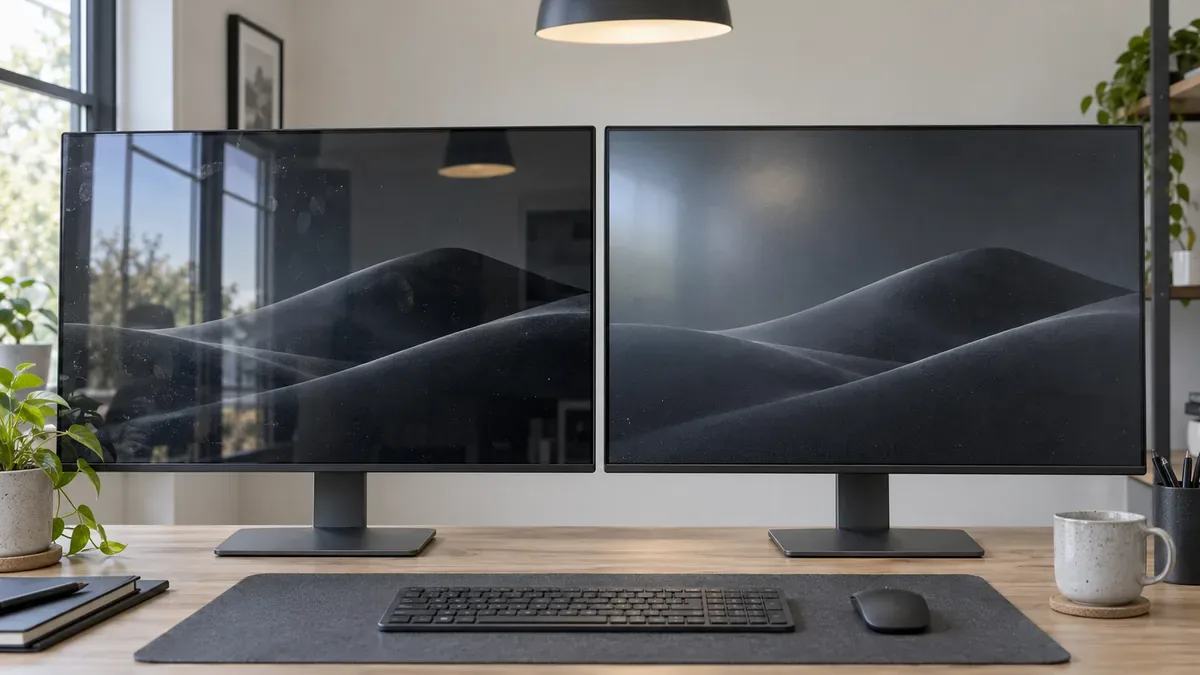
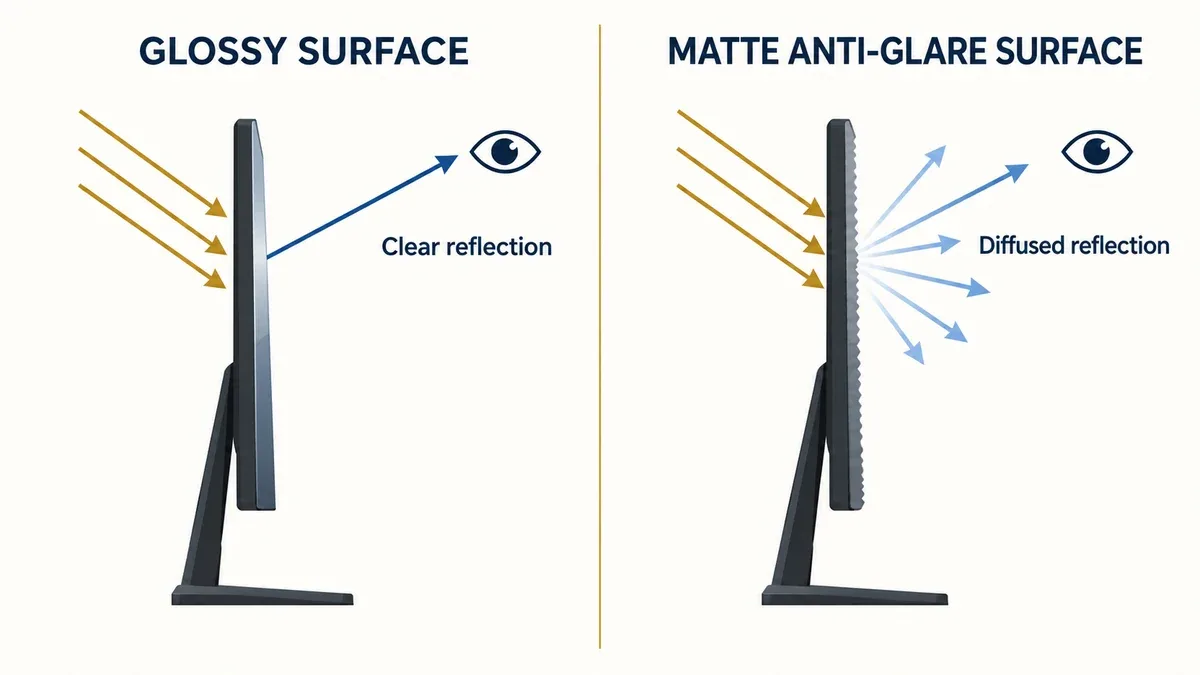
A glossy surface tends to show sharp, directional reflections. At the right angle, a window may appear clearly and compete with dark content.
A matte anti glare surface spreads the same light across a wider area, turning that window into a softer bright patch. Matte does not eliminate ambient light; a broad bright veil can still reduce visible contrast.
Glossy preserves a more direct looking image, while matte offers more flexible reflection control.
What Is a Glossy Monitor?
A glossy monitor has a relatively smooth surface. With less visible surface texture, fine details can appear clean and colors may look more vivid, especially in controlled lighting.
Windows, lamps, and the viewer may appear on dark content. Reflected light can also emphasize fingerprints, cleaning marks, and dust.
Glossy does not automatically mean greater color accuracy, a wider gamut, or higher measured contrast. It describes the surface finish, not the calibration or underlying panel quality.
What Is a Matte Monitor?
A matte monitor uses an anti glare surface treatment that diffuses ambient reflections, making it practical near windows or overhead lights.
Fingerprints and dust still collect, but are often less distracting. A strong treatment can introduce haze, grain, or sparkle on bright, uniform areas.
Not all matte coatings are equal. Light treatments retain more perceived clarity; stronger treatments control difficult reflections but can make surface texture more noticeable.
Why Fingerprints and Dust Are More Noticeable on Glossy Screens
Dust accumulates on both glossy and matte monitors. The main difference is how easily the user sees it.
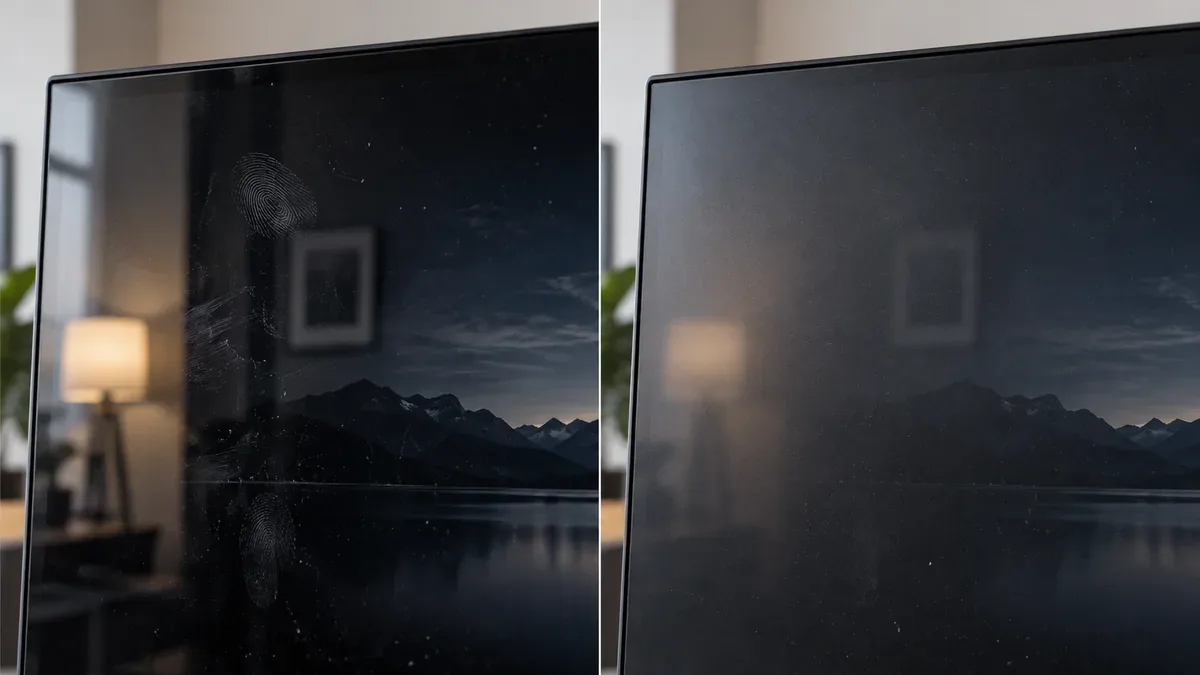
On a glossy display, clear reflections create contrast around fingerprints, oil, dust, and cleaning streaks. Marks are most obvious when the screen is off, content is dark, or a window or lamp is reflected.
Matte does not repel dust or stay cleaner. Diffused reflections merely make minor marks less prominent, and incorrect wiping can still leave residue.
Manufacturer Experience: Why Yanxun Display Often Uses Matte Screens for 19 and 19.5 Inch Monitors in Indonesia
Yanxun Display has supplied 19 inch and 19.5 inch TN monitors for customers serving the Indonesian market. In some projects, we encountered practical feedback that fingerprints and dust became especially conspicuous on glossy screens under everyday ambient light.
For some of these models, we therefore prefer or specify matte. This can suit offices, shops, schools, point of sale environments, and other applications where monitors are regularly handled or cleaned.
This is project level experience, not a claim that every Indonesian buyer prefers matte.
A finish that attracts attention in a showroom may not cause the fewest concerns after months of use. Surface selection must consider maintenance and customer expectations as well as first impressions.
Does Glossy Mean Better Color Accuracy?
No. Perceived vividness and measured color accuracy are different qualities.
A glossy screen may look more vivid because there is less surface diffusion. Accuracy instead depends on gamut, calibration, white point, gamma, uniformity, Delta E, bit depth, and the ICC profile.
A properly calibrated matte monitor can be more color accurate than an uncalibrated glossy monitor.
Takeaway: Screen finish affects perceived clarity and contrast. Panel performance and calibration determine color accuracy.
Does Matte Coating Reduce Sharpness?
A matte coating does not reduce the monitor's native resolution. A 3840 × 2160 matte display still contains 3840 × 2160 pixels.
Stronger anti glare texture can slightly reduce perceived edge clarity or add grain on bright areas. This may be noticeable with small text, spreadsheets, thin interface lines, or high pixel density displays viewed closely.
Resolution describes the pixel structure; perceived sharpness describes how clean those pixels look through the surface. Matte does not remove detail from the pixel grid.
Light Matte vs Heavy Matte
Matte is not one uniform finish. Light and heavy matte are practical descriptions, not universal grades.
Light matte offers moderate reflection control and relatively high perceived clarity, making it useful for mixed lighting.
Stronger matte diffuses reflections more aggressively but may show more haze or grain on bright content. Choose by lighting and use, not by the stronger sounding label.
What Is a Semi Glossy Monitor?
"Semi glossy" is an informal description, not a standardized classification. It usually means a finish between clearly glossy and strongly matte.
It can combine high perceived clarity with less mirror like reflection than glossy and less haze than strong matte.
| Finish | Reflection definition | Surface haze | Perceived clarity | Fingerprint visibility | Suitable lighting |
|---|---|---|---|---|---|
| Glossy | Sharp | Very low | Highest under controlled light | High | Dark or controlled rooms |
| Light matte or semi glossy | Moderately defined | Low | High | Medium | Mixed lighting |
| Matte | Diffused | More visible with stronger coatings | Can appear slightly softer | Lower visual prominence | Bright office or variable lighting |
Anti Glare vs Anti Reflective: They Are Not Exactly the Same
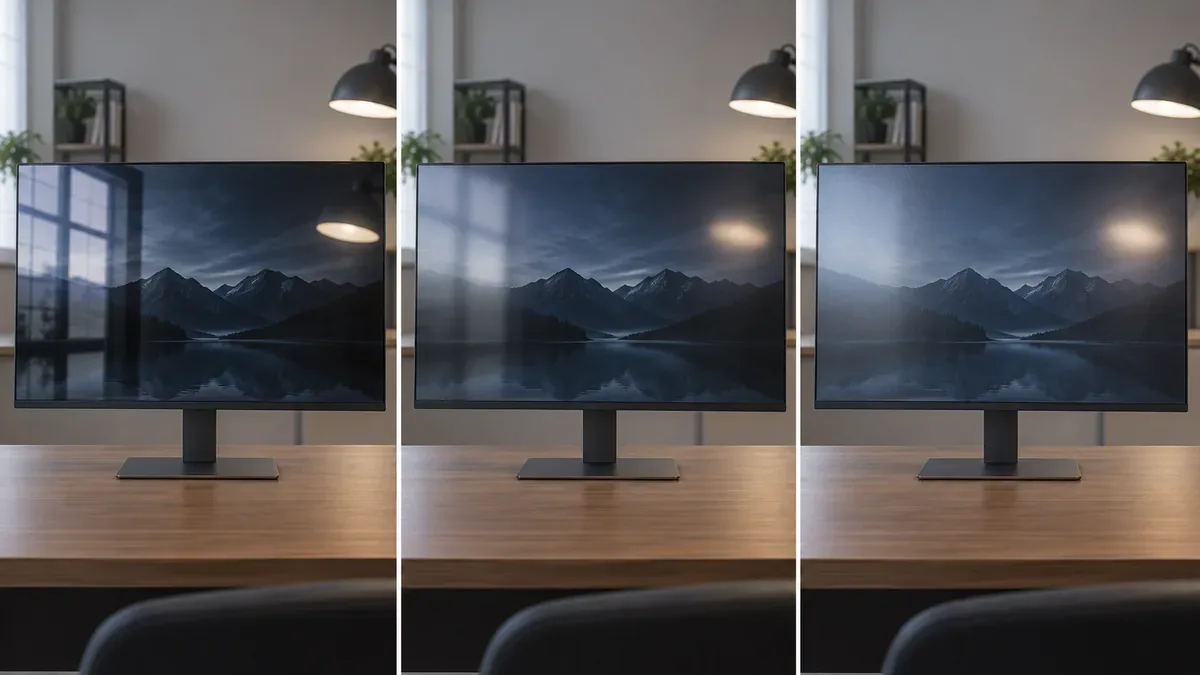
Anti glare treatment mainly softens sharp reflections through diffusion. Anti reflective treatment usually aims to reduce reflected light intensity through an optical surface treatment.
The terms can overlap in product literature. A glossy looking screen may include anti reflective treatment, while matte does not guarantee perfect reflection control.
Performance depends on the actual coating and the monitor's position relative to surrounding light.
Room Lighting Can Matter More Than the Screen Finish
Dark Gaming Room
Glossy and light matte can work well when lamps and windows are controlled, allowing perceived clarity and dark content to stand out.
Window Behind the User
Matte is normally more practical because a glossy display may reproduce the window clearly, especially during dark scenes.
Window Beside the Monitor
A glossy monitor can still work if the window is not reflected toward the viewer. Monitor angle and desk orientation matter.
Office With Ceiling Lights
Matte is generally more versatile because overhead fixtures can create repeated reflections on glossy surfaces.
Mixed Day and Night Use
Light matte, semi glossy, or effective anti reflective treatment can balance bright daytime and controlled evening use.
Try This 10 Second Reflection Test Before Choosing a Monitor
- Sit in your normal working position.
- Turn your existing monitor off.
- Look at the dark screen.
- Check whether you can clearly see your face, a window, ceiling lights, desk lamps, or bright walls.
- Repeat the check during daytime and evening if the lighting changes significantly.
If objects are clearly reflected during working hours, prioritize reflection control. If little is reflected, glossy or lighter matte finishes may be practical.
Glossy vs Matte Monitor for Gaming
Glossy can provide strong perceived clarity and attractive dark scenes in controlled lighting. This can suit story driven games and movies, but the coating itself does not improve refresh rate, response time, input lag, or HDR capability.
Matte is often more convenient for daytime gaming, shared rooms, and competitive play where a reflected lamp or window would distract.
When comparing gaming monitors, consider the room alongside refresh rate, response behavior, resolution, and panel type.
Glossy vs Matte Monitor for Office Work
Excel, Word, email, coding, ERP systems, and dashboards often use bright backgrounds. During long sessions, controlling reflections may matter more than vividness.
This supports using matte on some 19 inch and 19.5 inch commercial models that are regularly touched, repositioned, and cleaned.
For most bright workplaces, office monitors with matte or light matte finishes provide the more flexible setup.
Glossy vs Matte for Photo and Video Editing
Screen finish is separate from professional color performance. Prioritize gamut, calibration, Delta E, uniformity, gamma, white point, brightness, and contrast.
Glossy can work well in a controlled studio. Matte may be more practical where bright or changing ambient light would interfere.
Choose using both measurable display performance and the editing environment.
Glossy vs Matte on IPS, VA, TN and OLED Monitors
IPS
IPS describes panel technology, not finish. IPS monitors can be glossy, light matte, or matte, so check coating separately from viewing angle and color specifications.
VA
VA's native contrast comes from the panel, not a glossy coating. Glossy may look rich in controlled light, but reflections can reduce practical visibility.
TN
TN also supports different finishes. Yanxun Display has found matte practical for some 19 inch and 19.5 inch commercial TN models where frequent handling emphasizes glossy fingerprints.
OLED
OLED monitors can be glossy, semi glossy, or matte. Ambient light and the optical stack still influence perceived black performance even though OLED pixels can switch off.
Does Screen Finish Affect Viewing Angles?
Panel technology is the main factor determining viewing angle behavior.
Finish can affect practical visibility when reflections strengthen at an angle, but this is not the same as the panel's viewing angle specification.
Is Glossy or Matte Better for Your Eyes?
Neither finish automatically protects eyesight or prevents eye strain.
Comfort also depends on brightness, room lighting, viewing distance, text size, actual flicker or PWM behavior, duration, and screen position. Matte can reduce distracting reflections, but is not an eye care technology by itself.
Appropriate brightness and room setup remain important with either finish.
How Can You Tell if Your Monitor Is Glossy or Matte?
Turn the monitor off and look at the dark surface from your normal seat.
A sharp, mirror like image of your face, a window, or a lamp suggests glossy. Blurred reflections spread into softer patches suggest matte.
This is a practical check, not a laboratory classification.
Can You Add an Anti Glare Film to a Glossy Monitor?
Third party anti glare films may reduce reflections, but can also reduce perceived clarity, change texture, or trap bubbles and dust.
A film may affect touch operation, so check compatibility. Do not remove a factory coating; it is part of the display assembly, not a removable accessory.
How Yanxun Display Chooses Screen Finish for OEM Monitor Projects
For OEM and wholesale monitor projects, Yanxun Display considers target market, lighting, use, size, panel availability, maintenance, customer preference, and final sample inspection.
Glossy or lighter treatments can suit controlled entertainment spaces. Matte may be more practical for offices, schools, shops, and commercial environments.
In some 19 inch and 19.5 inch TN projects for Indonesia, visible fingerprints, dust, and reflections led us to prefer matte on certain models.
Do not infer finish from IPS, VA, TN, FHD, or 4K. Confirm the panel specification and inspect the complete sample under target lighting, especially when cover glass, touch layers, or lamination are involved.
Glossy vs Matte Monitor: Which Should You Choose?
| Environment or priority | Practical starting point |
|---|---|
| Dark gaming room | Glossy or light matte |
| Window behind the user | Matte |
| Bright office | Matte |
| Photo studio with controlled lighting | Glossy or light matte |
| All day productivity | Matte or light matte |
| Movie and HDR use | Glossy if reflections are controlled |
| Competitive gaming | Matte or light matte |
| Mixed office and gaming | Light matte or semi glossy |
| 19 and 19.5 inch commercial monitor | Matte as a practical starting point, subject to the project |
| Maximum perceived clarity | Glossy if reflections can be controlled |
| Fingerprints and dust are frequently noticed | Matte |
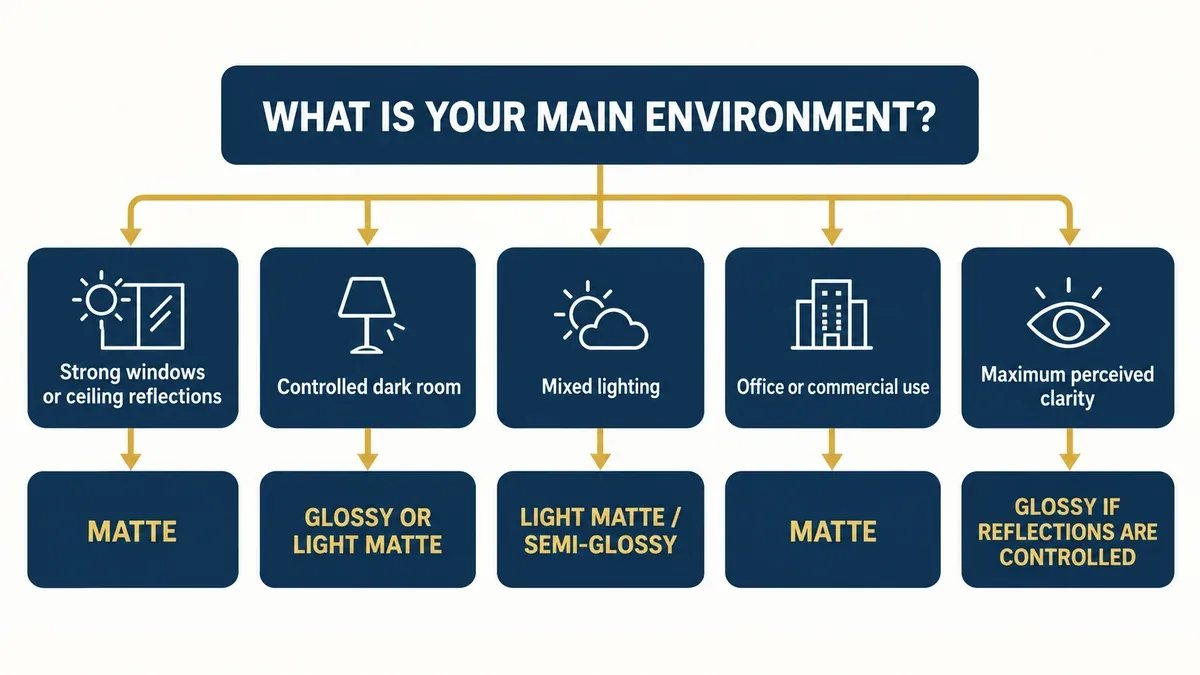
These are starting points. A well positioned glossy monitor can work in a bright room, while strong matte may be unnecessary in a controlled workspace.
Frequently Asked Questions
Is glossy or matte better for a computer monitor?
It depends on the room and how the monitor is used. Glossy often offers higher perceived clarity when reflections are controlled. Matte is usually more practical near windows, lamps, and office ceiling lights. Neither finish is universally better, so room lighting should guide the choice.
Why do glossy monitors look clearer?
A glossy surface has less visible texture and scatters less of the displayed image at the surface. Fine details can therefore look more direct. This is perceived clarity, not proof of higher resolution, gamut, or color accuracy, and strong room reflections can reverse the advantage.
Does a matte screen reduce image quality?
A strong matte coating may add slight haze or grain, particularly on bright backgrounds. A light matte finish can be much less noticeable. The effect is a surface characteristic and does not mean the underlying panel has lower technical quality.
Does matte coating reduce monitor resolution?
No. Matte coating does not change the pixel count. A 4K matte monitor remains a 4K monitor. Strong surface diffusion can soften perceived edges slightly, but the pixel grid and native resolution remain unchanged. Only the surface appearance changes.
Is glossy or matte better for gaming?
Glossy can look excellent in a controlled dark room. Matte is more convenient for daylight, shared rooms, and changing light. Game type, monitor position, and room lighting matter more than a universal glossy or matte rule. Neither finish changes gaming performance.
Is matte better for office work?
Matte is often more practical because offices commonly have windows, bright backgrounds, and ceiling lights. It can reduce defined reflections during long document, spreadsheet, and coding sessions. A light matte finish may offer a good compromise in a controlled office.
Is glossy better for photo editing?
Not automatically. Glossy can offer strong perceived clarity in a controlled studio, but accurate editing depends more on gamut, calibration, Delta E, gamma, white point, and uniformity. A calibrated matte monitor may be more accurate than an uncalibrated glossy model.
Are OLED monitors glossy or matte?
OLED monitors are available with glossy, semi glossy, and matte surface treatments. OLED describes the display technology, not the coating. Buyers should check the specific model rather than assume every OLED monitor has the same finish, because surface treatment varies among products.
What is the difference between anti glare and anti reflective?
Anti glare treatment generally diffuses reflections so objects are less clearly defined. Anti reflective treatment aims to reduce reflected light intensity through an optical surface design. Actual implementations and marketing terms vary, so evaluate the finished screen in realistic lighting.
Why are fingerprints easier to see on glossy screens?
Glossy reflections create stronger contrast around skin oil, smudges, and cleaning streaks, especially on a dark or switched off screen. Matte diffusion can make the same marks less visually prominent, although it does not prevent them. Both finishes still need careful cleaning.
Does a matte monitor collect less dust?
No. Dust settles on both glossy and matte monitors. Matte surfaces can make minor particles less noticeable because reflected light is diffused, but they still require appropriate cleaning. The same particles can simply be less obvious during normal use, while cleaning frequency depends on the room and handling.
How can I tell if my monitor is glossy or matte?
Turn the monitor off and examine the screen. A sharp reflection usually indicates a glossy or relatively glossy finish. A blurred, softened reflection usually indicates matte treatment. This is a useful visual check rather than a formal coating classification; check several angles if uncertain.