
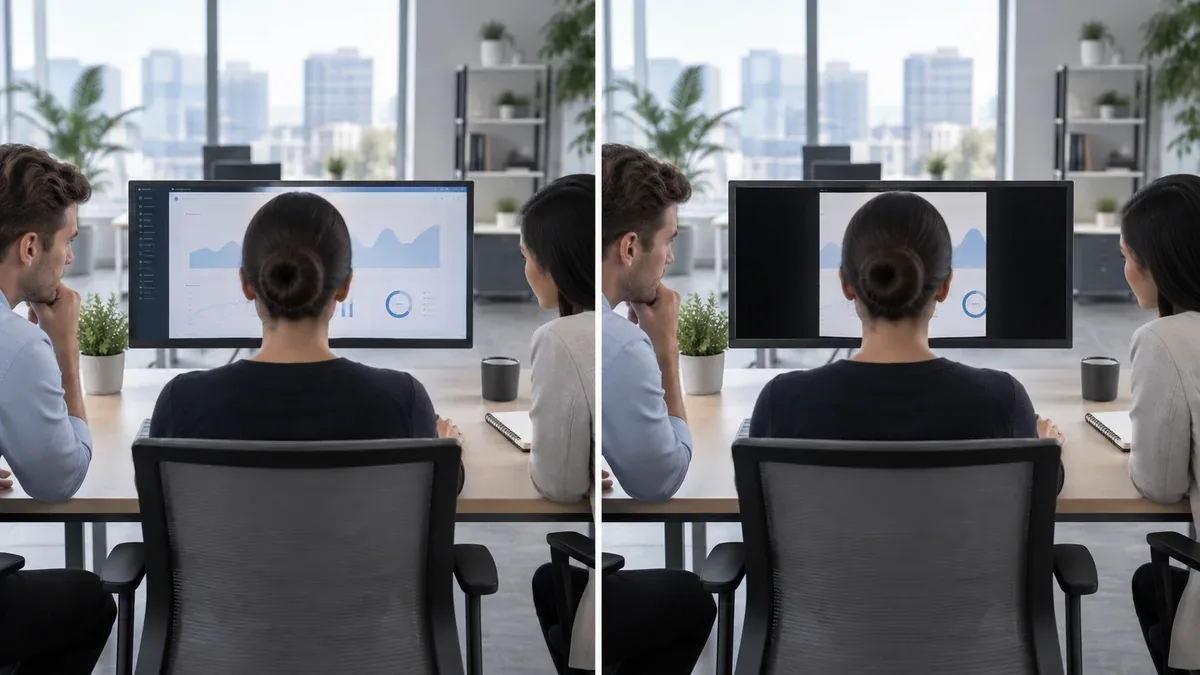
Computer monitors are designed to make information easy to see, but that can become a problem in open offices, reception areas, shared workspaces, airports, and other public environments.
A person sitting beside you may be able to read emails, customer information, financial data, or other content displayed on your monitor.
A monitor privacy screen is a physical filter placed in front of the display to reduce side visibility. It keeps the screen usable for the person sitting directly in front of the monitor while making the image significantly darker when viewed from wider angles.
You may also see these products described as a privacy screen protector, computer privacy screen, privacy filter for monitor, or privacy screen for computer monitor.
But how do privacy screens actually work, and does the type of monitor panel underneath make a difference?
What Is a Monitor Privacy Screen?
A monitor privacy screen is a thin optical filter installed over the visible area of a computer display.
Its main purpose is not to protect the LCD panel from scratches. Instead, it controls the directions from which light leaving the display can be seen clearly.
When you sit directly in front of the monitor, the screen remains visible, although some loss of brightness or contrast is normal. As you move farther to the left or right, the image gradually becomes darker and more difficult to read.
This makes privacy filters useful in environments where information should be visible primarily to the person using the computer.
Common applications include:
- Open-plan offices
- Reception desks
- Banks and financial institutions
- Hospitals and clinics
- Government offices
- Customer service counters
- Airports and public work areas
- Shared computer workstations
- Business environments handling confidential information
A privacy screen does not make the monitor completely invisible from every direction. Its purpose is to reduce useful off-axis viewing, not to guarantee confidentiality.
How Do Privacy Screens Work?
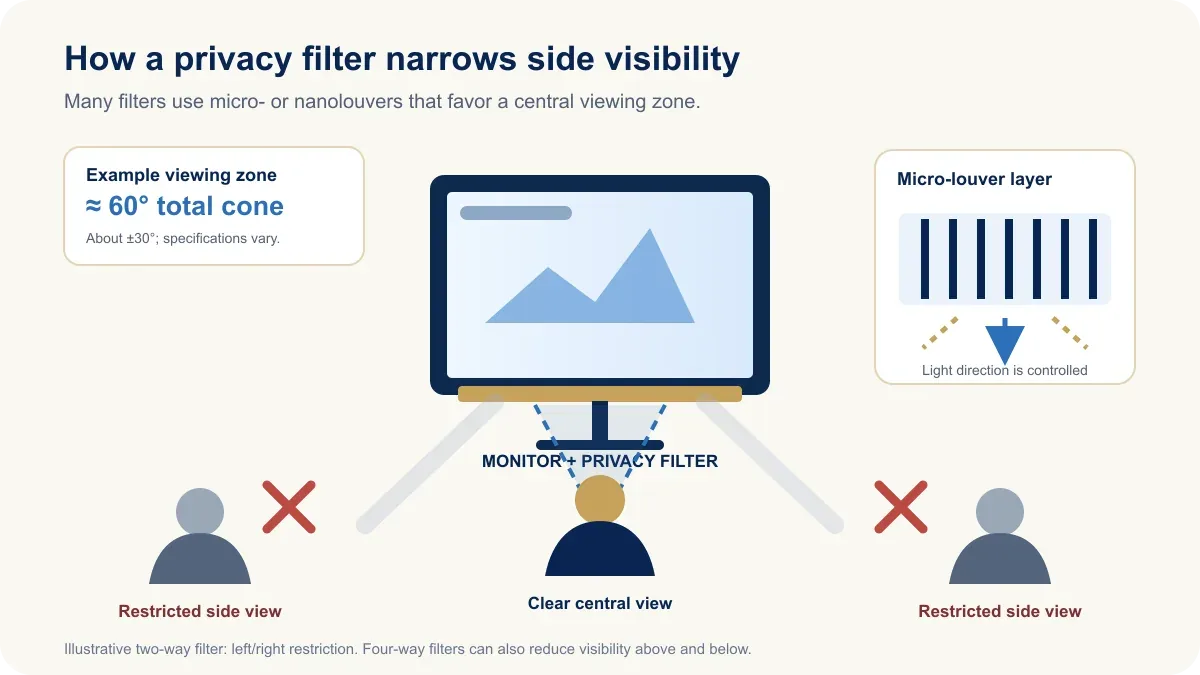
Many monitor privacy filters use microscopic structures often compared with very small blinds. These structures may be described as micro-louvers or nano-louvers. Other filter constructions also exist, so not every product uses exactly the same optical design.
With a typical louver-based filter, light traveling toward the person directly in front of the monitor can pass through more easily. Light traveling toward wider angles is blocked or restricted.
- Center viewing position: the screen remains visible.
- Side viewing position: the screen becomes much darker.
The exact privacy angle depends on the filter design and on how the manufacturer defines and measures it. A product described as having a 60-degree viewing area usually means a total horizontal cone of about 60 degrees—approximately 30 degrees to the left and 30 degrees to the right of the centered viewing position—not 60 degrees on each side.
Many desktop filters are 2-way privacy filters, which mainly restrict horizontal viewing from the left and right. A 4-way privacy filter also restricts viewing from above and below. Check the product specification rather than assuming that all filters protect in four directions.
This is why a privacy screen works best when the user sits approximately centered in front of the monitor.
Monitor Viewing Angles: IPS vs VA vs TN vs OLED
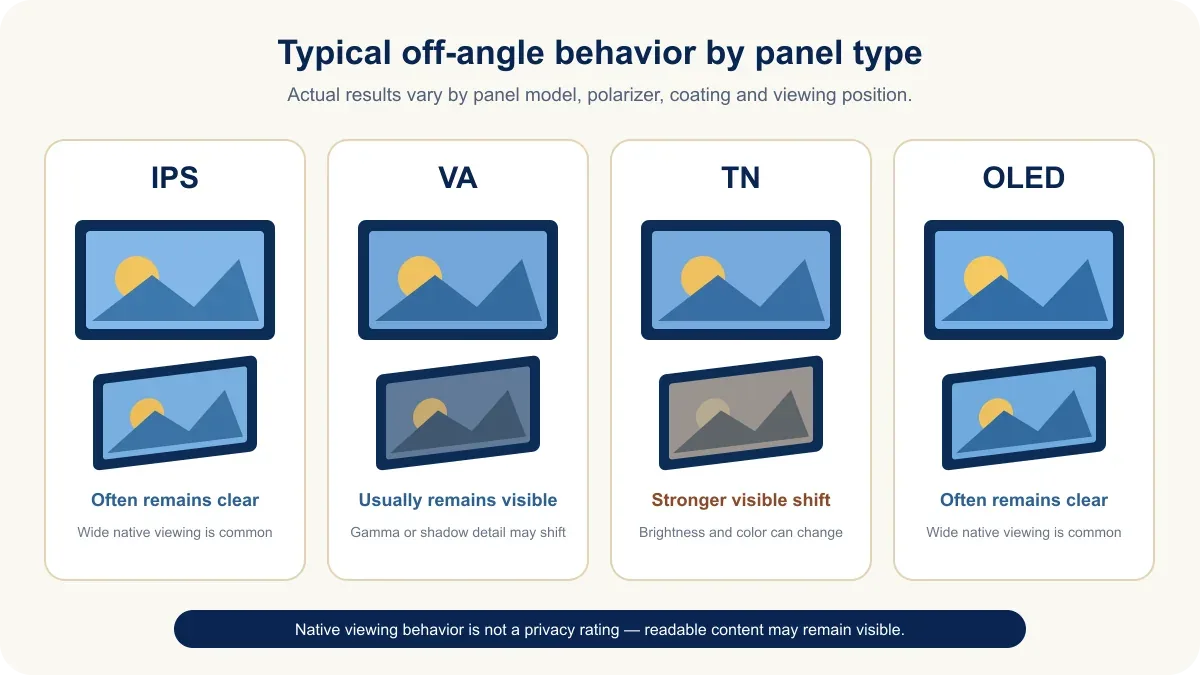
The panel technology inside a monitor already affects how the display looks when viewed from different angles. This matters because a privacy screen is installed on top of those native viewing characteristics.
A monitor designed for wide viewing angles may remain clearly visible to people sitting beside the user unless a privacy filter is added. The following behaviors are typical rather than universal; actual performance varies by panel model, polarizer, coating, and monitor design.
| Panel type | Typical viewing characteristics | Typical side visibility |
|---|---|---|
| IPS | Wide viewing angles; many models advertise 178-degree horizontal and vertical specifications | Content often remains relatively easy to see from the side |
| VA | Wide advertised viewing angles, with possible off-center gamma and color changes | The image often remains readable despite visible shifts |
| TN | Generally narrower effective viewing angles, especially vertically | Brightness and colors often change more noticeably off center, but content may remain readable |
| OLED | Typically very wide viewing angles | The image can remain highly visible from wide positions |
A quoted 178-degree viewing angle is a model specification based on the maker's test criterion, often a minimum contrast-ratio or color-performance threshold. It should not be read as a promise that the picture looks perfectly uniform at every angle.
IPS Monitor Viewing Angles
IPS panels are widely used where color consistency and wide viewing angles are important. Many IPS monitor specifications list viewing angles of approximately 178 degrees horizontally and vertically under the manufacturer's stated test conditions.
This often allows people sitting beside the monitor to continue seeing the image relatively clearly. That is useful for:
- Collaborative office work
- Design review
- Meetings
- Shared screens
- Multi-person workstations
However, the same characteristic can create a privacy problem. If you are displaying confidential information in an open office, the wide viewing characteristics of an IPS panel can make it easier for nearby people to see what is on the screen. A privacy screen can intentionally reduce that viewing area.
VA Monitor Viewing Angles
VA panels also commonly list wide viewing-angle specifications. However, VA panels may behave differently from IPS displays when viewed away from the center.
Depending on the specific panel, users may notice changes in:
- Gamma
- Brightness
- Contrast
- Shadow detail
- Color appearance
The screen may still remain readable from a wide angle. For this reason, the native behavior of a VA panel should not be considered a privacy feature. If visual confidentiality is important, a dedicated privacy filter is still more appropriate.
TN Monitor Viewing Angles
TN panels generally have more noticeable viewing-angle limitations. Colors and brightness can change significantly when the display is viewed from above, below, or from the side.
This can sometimes make a TN monitor appear more private than an IPS monitor. However, poor off-angle image quality is not the same as privacy protection. Even if the colors become inaccurate, text, numbers, or documents may still be readable.
A narrower native viewing angle should therefore not be treated as a security feature.
OLED Monitor Viewing Angles
OLED monitors generally provide very wide viewing angles and often retain strong contrast and color when viewed off axis. Actual performance still varies by panel stack, coating, and monitor model.
That is excellent for image consistency and shared viewing. However, it also means that someone sitting beside an OLED monitor may still have a good view of the displayed content.
A privacy screen can still be useful in professional environments where side visibility needs to be reduced. Users should simply be aware that adding a privacy filter may affect the brightness, contrast, and appearance of the display.
Native Viewing Angle vs Privacy Viewing Angle
A monitor specification such as a 178-degree viewing angle and a privacy-filter viewing angle describe two very different things.
A wide monitor viewing angle is intended to keep the image usable when the viewer moves away from the center. A privacy screen does the opposite: its purpose is to intentionally reduce the useful viewing area.
- Wide-viewing-angle panel: designed to remain visible from more positions.
- Privacy screen: designed to reduce visibility from off-axis positions.
This means a monitor can have an IPS panel with very wide native viewing angles while still becoming difficult to see from the side after a compatible privacy filter is installed.
Privacy Screen Protector vs Regular Screen Protector
A regular screen protector and a privacy screen protector are not the same product.
A conventional screen protector is mainly designed to help protect the display surface from:
- Scratches
- Fingerprints
- Dust
- Minor surface damage
A privacy screen adds an optical filtering function that reduces off-axis visibility.
Some privacy filters also offer:
- Anti-glare surfaces
- Scratch resistance
- Matte coatings
- Reduced reflections
However, these functions are separate from privacy filtering. Do not assume that every privacy screen automatically provides strong anti-glare performance or physical impact protection.
Does a Privacy Screen Affect Monitor Image Quality?
Yes, it can. A privacy filter works by controlling light leaving the display, so some reduction in on-axis brightness and contrast is normal.
Depending on the filter and monitor combination, users may notice changes in:
- Brightness
- Contrast
- Color appearance
- Viewing angle
- Screen clarity
For normal office work, these compromises may be acceptable. For professional color-critical applications such as photo editing, video grading, or design work, a privacy filter may be less suitable while accurate image evaluation is required.
A passive privacy filter does not change the monitor's electronic refresh rate or pixel response time. It can make the picture dimmer or less clear, but it does not convert a 144 Hz display into a lower-refresh-rate display or alter the panel's response-time setting.
The practical tradeoff is simple: more viewing privacy usually means less viewing freedom and some loss of image brightness.
Privacy Filter Image Quality and Selection Checklist
Do not assume that every privacy filter reduces brightness by the same percentage. Light transmission is product-specific: premium filters may retain substantially more display light than standard black filters. Compare the rated light transmission for the exact model rather than relying on a universal brightness-loss figure.
- Brightness: If the filtered image looks too dim, increase the monitor brightness only to a comfortable level. A higher-brightness monitor can provide more usable headroom, but it does not eliminate the filter's optical loss.
- Moiré and visual artifacts: In some monitor-and-filter combinations, a micro-louver pattern can interact with the LCD pixel grid and produce faint stripes or a moiré pattern. Correct fit and orientation can matter, so choose a filter intended for the display's size and aspect ratio and follow the manufacturer's installation guidance.
- Touch compatibility: Do not assume that every filter works well with a touchscreen. Choose a model explicitly marked as touchscreen-compatible, and confirm that its attachment method will not obstruct cameras, sensors, or edge gestures.
- Color-sensitive work: Remove the filter before making critical color, contrast, or brightness judgments unless the workflow has been evaluated with that exact filter installed.
Does a Privacy Screen Reduce Glare?
Some privacy screens include an anti-glare surface, but privacy filtering and glare reduction are different functions.
A privacy filter controls viewing direction. An anti-glare coating reduces reflections from surrounding lights, windows, and other bright surfaces.
Some products combine both features, while others focus mainly on privacy. Always check the actual product specification.
Who Should Use a Computer Privacy Screen?
A computer privacy screen is most useful when sensitive information is displayed in an area where other people may easily see the monitor.
Examples include employees handling:
- Customer records
- Financial information
- Internal company documents
- Personal information
- Medical information
- Account information
- Password-protected systems
Even when a computer itself is secure, the information visible on its screen can still be exposed. Someone nearby may simply look at the display. This is often described as shoulder surfing or visual hacking.
A privacy filter adds a physical layer of visual privacy. However, it should complement normal information-security practices rather than replace them. It does not block a person or camera positioned inside the clear central viewing area, guarantee that no one can see the display, prevent viewing from every position, or establish compliance with any privacy or security requirement by itself.

Privacy Screen for Laptop vs Desktop Monitor
Privacy filters are available for both laptops and desktop monitors.
Laptop privacy screens are usually smaller and often designed for:
- 13-inch displays
- 14-inch displays
- 15.6-inch displays
- 16-inch displays
Desktop monitor privacy filters are commonly designed for larger displays such as:
- 21.5-inch displays
- 23.8-inch displays
- 24-inch displays
- 27-inch displays
- 32-inch displays
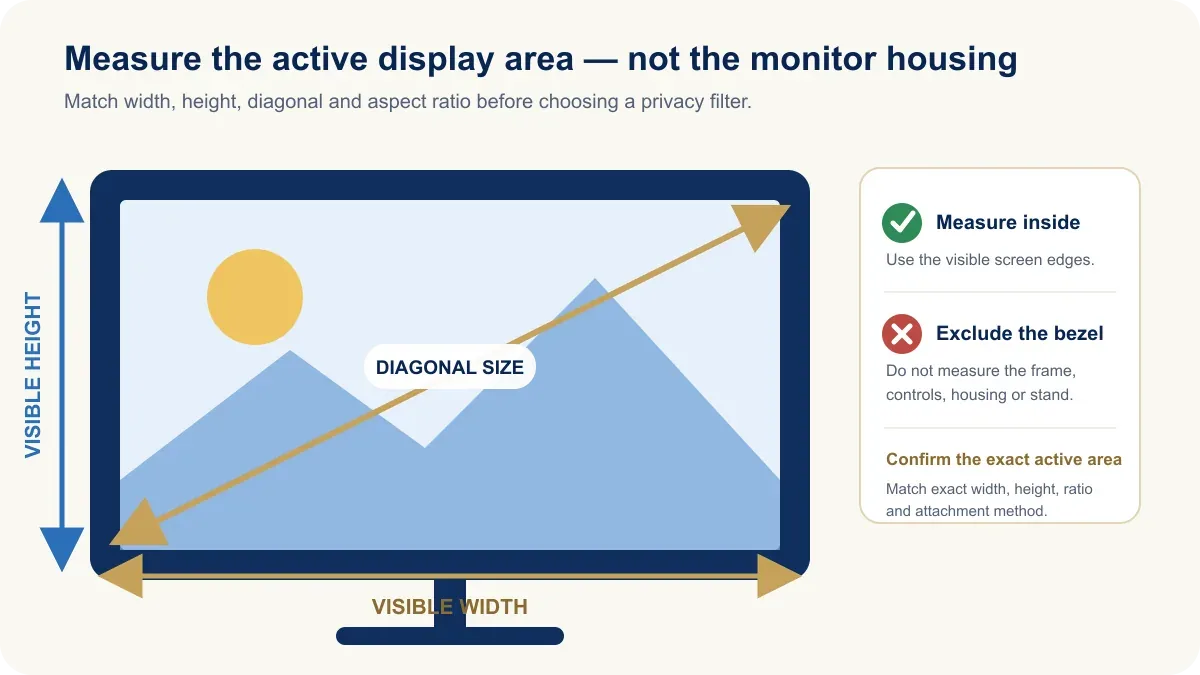
However, screen diagonal alone is not enough to select the correct filter. You should also check the exact active screen dimensions.
How to Measure a Monitor for a Privacy Screen
Monitor size is measured diagonally across the visible display area. The bezel is not included.
However, when buying a privacy screen, checking only the diagonal size can lead to mistakes. Measure the active display or verify its dimensions in the monitor specification. The Monitor Size Calculator can help you compare diagonal size, aspect ratio, width, and height.
Screen Width
Measure only the active visible display area from left to right.
Screen Height
Measure the active display area from top to bottom.
Diagonal Size
Measure from one visible screen corner to the opposite visible corner.
Aspect Ratio
Common examples include:
- 16:9
- 16:10
- 21:9
- 32:9
Mounting Method
Privacy filters may use:
- Sliding tabs
- Adhesive mounting strips
- Magnetic attachment
- Removable clips
A correctly sized privacy filter should match the exact active-area width and height as closely as the product's stated tolerances allow. Confirm the aspect ratio and mounting method as well; do not size the filter from the outside dimensions of the monitor housing.
24 Inch vs 27 Inch Monitor Privacy Screens
Two of the most common office monitor sizes are 24 inch and 27 inch.
A 24-inch privacy screen is normally designed for a 23.8-inch or 24-inch-class monitor. A 27-inch privacy screen covers a noticeably larger visible area.
However, do not rely only on the advertised diagonal. The privacy filter must still match:
- Exact active-screen width
- Exact active-screen height
- Aspect ratio
- Compatible mounting space and bezel design
This becomes even more important with ultrawide displays. A 34-inch 21:9 monitor has very different proportions from a conventional 32-inch 16:9 monitor.
Are Privacy Screens Good for Gaming Monitors?
Privacy screens are usually more useful for office monitors than personal gaming monitors.
Gaming displays often emphasize:
- Brightness
- Wide viewing angles
- High refresh rates
- Fast response times
- High image clarity
- Strong color performance
A privacy filter can reduce brightness, contrast, clarity, and viewing freedom. It does not electronically lower the display's refresh rate or increase the panel's response time, but the optical tradeoffs may still be undesirable for gaming.
For a gaming setup in a private room, a privacy filter may provide little practical benefit. However, a gaming monitor used in an office or professional environment may still benefit from a privacy filter if the displayed information is sensitive.
The decision should depend on the use case rather than the monitor category.
Choosing a Monitor for a Privacy-Sensitive Workspace
A privacy screen is only one part of a practical workstation. You should also consider:
- Monitor size
- Resolution
- Panel type
- Brightness
- Stand adjustment
- Viewing distance
- Desk position
- Office layout
Monitor positioning can also improve privacy. For example, turning a display away from a corridor or placing it against a wall may reduce unwanted viewing without requiring additional accessories.
For workstations where that is not possible, a privacy filter can provide an additional layer of visual protection.
Yanxun Display offers office monitors in common desktop sizes, including a 24 inch office monitor and a 27 inch monitor. Compare the display's exact active-area dimensions with the privacy filter specification before choosing a combination.
Frequently Asked Questions
How do privacy screens work?
Privacy screens use an optical filter to restrict the directions from which light from a monitor can be clearly viewed. The screen remains visible to the person directly in front of it while appearing significantly darker from wider side angles. Many models use micro- or nano-louver structures, but designs vary.
What is a privacy screen for a computer monitor?
A privacy screen for a computer monitor is a physical filter placed over the display to reduce off-axis viewing and make information more difficult for nearby people to read.
Do monitor privacy screens really work?
A properly sized and positioned privacy filter can significantly reduce side visibility when the monitor is viewed outside its intended central viewing area. However, it does not make the display invisible from every possible direction or guarantee confidentiality.
Does a privacy screen make the monitor darker?
Usually, yes. Because the filter blocks or redirects some light, the display may appear less bright and may have lower apparent contrast after installation.
Does an IPS monitor need a privacy screen?
IPS panels typically provide wide viewing angles, which means screen content may remain visible from the side. If the monitor is used in an environment where visual privacy matters, a compatible privacy filter can reduce that side visibility.
Is a TN panel already private because of its narrow viewing angle?
No. A TN panel may show stronger color and brightness changes from an angle, but text or other information can still remain readable. Native viewing-angle limitations are not the same as privacy filtering.
What size privacy screen do I need?
Check the monitor's diagonal, exact active-area width and height, aspect ratio, and compatible mounting method. The filter should match the visible display area rather than the outside dimensions of the monitor housing.