
A monitor can be advertised as 100% sRGB, 95% DCI-P3, or 72% NTSC 1953, but those numbers are not verified by displaying a few color patches in a browser. Software controls the signal sent to the monitor. It does not measure the light that the panel and backlight actually produce.
To test monitor color gamut, a physical sensor must read the screen. At Yanxun Display, we use a Datacolor SpyderX Pro colorimeter. That measurement tells us whether the hardware in front of us produces the claimed range of colors—not merely whether its EDID or specification sheet reports a target.
Why Software Alone Cannot Measure Monitor Color Gamut
Browser tests, Windows utilities, test images, and EDID readers are useful diagnostic tools. They can reveal gradient banding, clipped tones, an incorrect color mode, or a failed color channel. They can also show what the monitor reports about itself. None of them can calculate the display's physical gamut without measurement hardware.
Consider two monitors receiving the same digital red value: RGB 255, 0, 0. The computer knows that it sent the same value to both displays. It does not know whether the first monitor produced a deeper red, a more orange red, or a less saturated red. The result depends on the complete optical and electronic system:
- LCD cell and color-filter characteristics
- Backlight spectrum and optical films
- Panel transmittance and polarizers
- Gamma, RGB balance, firmware, and OSD mode
- Driver-board tuning and signal processing
A software patch is the stimulus. It is not the measurement. A colorimeter closes that gap by reading the emitted light.
How Hardware Color-Gamut Testing Works
A colorimeter is placed flat against the active display area while its software presents a controlled sequence of color patches. The sensor measures the light from those patches, and the software maps the measured primaries against reference color spaces. Datacolor describes this same process in its gamut measurement documentation: the display shows the required patches, the sensor reads them, and the result is plotted on a color-space graph.
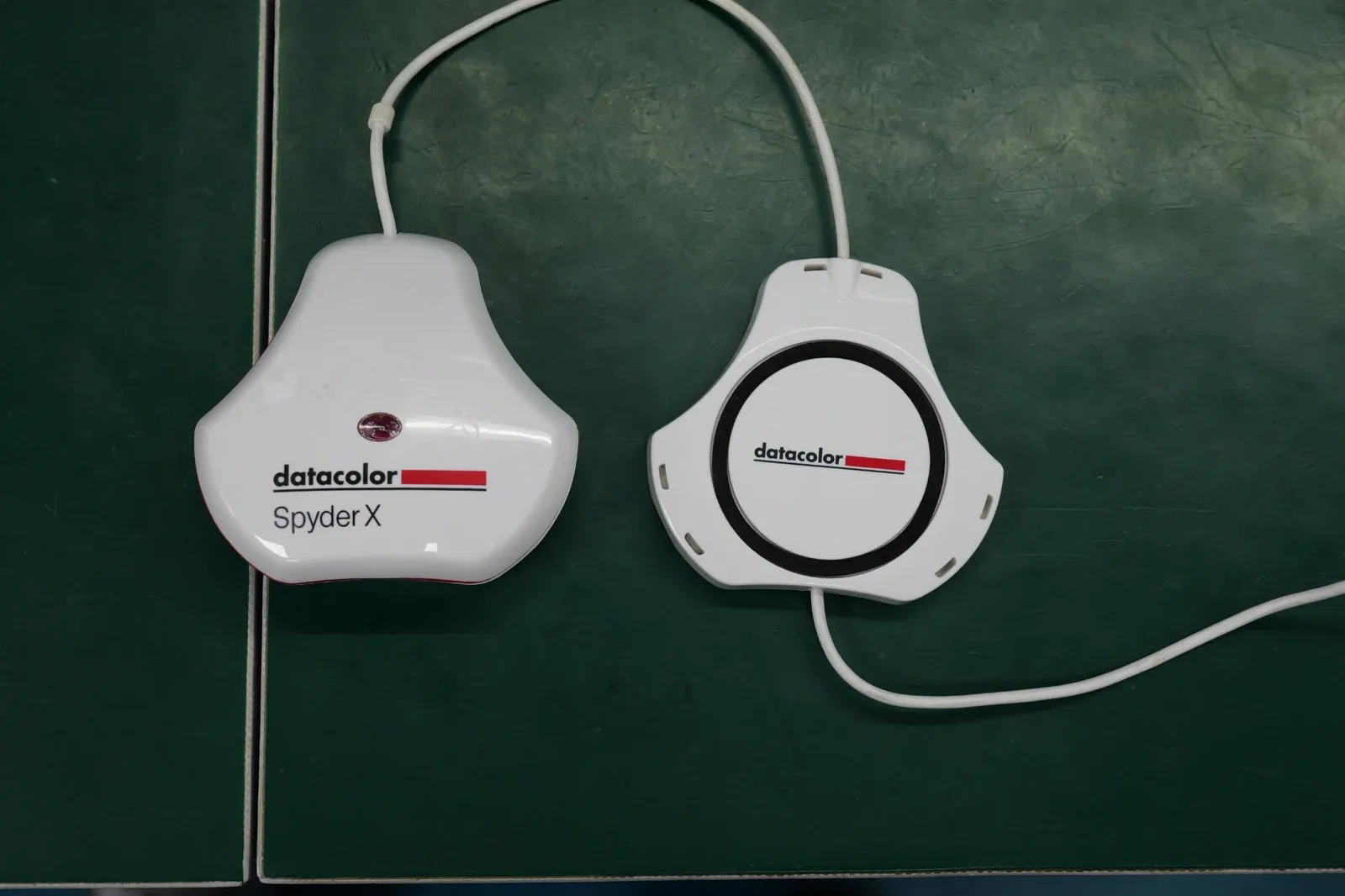
This answers a different question from an EDID reader or visual test. Software can tell us what the system requested. The colorimeter tells us what the monitor produced. The resulting gamut can then be compared with sRGB, Adobe RGB, P3, and NTSC reference spaces.
How Yanxun Display Uses Color Measurement in Production
Color testing begins with the display solution, not with a marketing label. For an OEM project, we review the selected panel or Open Cell, backlight arrangement, optical materials, driver configuration, and required display mode. A sample can be measured before full assembly, during product validation, or from finished production, depending on the project.
We use sample inspection because the purpose is to verify the production solution and monitor its consistency. If a project uses the same panel, backlight, optical stack, firmware, and OSD configuration, representative samples provide meaningful evidence about the batch. Projects with stricter color requirements can use a denser sampling plan and additional checks for gamma, white point, brightness, color accuracy, and uniformity.
This is also why a gamut figure in a quotation should be tied to a defined hardware configuration. Changing the panel or, in an Open Cell build, changing the backlight and optical stack can change the gamut result.
A Real SpyderX Pro Monitor Gamut Result
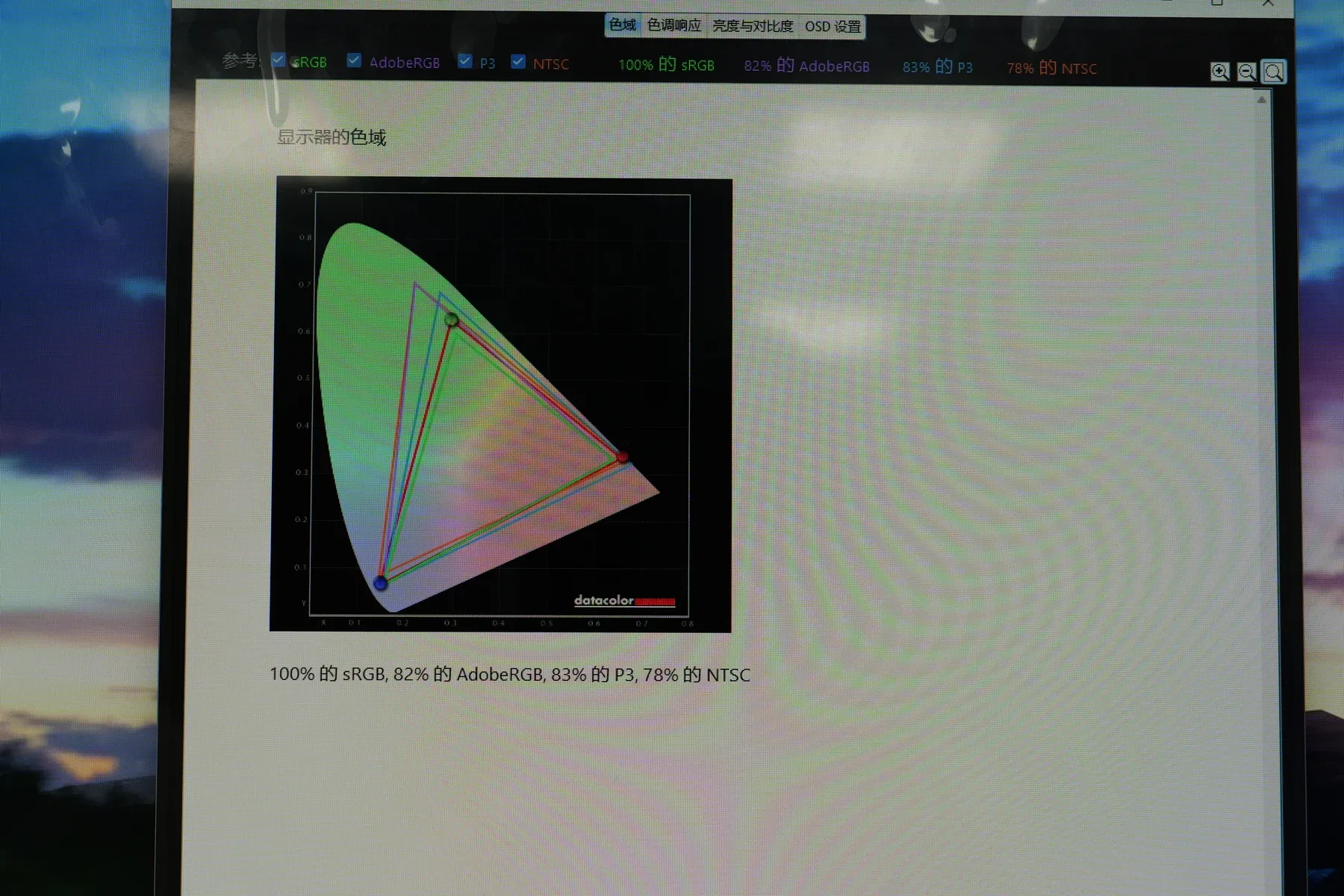
| Reference space | Measured coverage |
|---|---|
| sRGB | 100% |
| Adobe RGB | 82% |
| P3 | 83% |
| NTSC | 78% |
This is a real sampled result, not a number copied from a brochure. The software labels the third result as P3, so that is the wording we retain; we do not relabel the screenshot as a more specific P3 variant. The four percentages compare one measured native gamut with four different reference spaces. They are not four separate modes and should not be averaged into a single score.
The result also demonstrates why 100% sRGB and 83% P3 can both be correct. P3 covers a larger and differently shaped area than sRGB. The monitor can cover the full smaller reference while covering only part of the wider one.
What 100% sRGB Does—and Does Not—Prove
sRGB remains the practical reference for websites, office software, online retail images, education, and general desktop content. A measured 100% sRGB result means the display's gamut covers approximately the full sRGB reference under the test conditions. HD SDR video normally uses Rec.709; it shares sRGB's primaries and D65 white point, but its transfer conventions and viewing assumptions are not identical.
It does not prove perfect color accuracy. Gamut coverage measures range; accuracy measures how closely specific displayed colors match their intended values. A monitor can cover 100% sRGB and still have an incorrect white point, inaccurate grayscale, uneven color across the panel, or a tone response that needs adjustment. For color-critical work, gamut, Delta E, gamma, white point, brightness, and uniformity are separate parts of the evaluation.
sRGB vs DCI-P3: Choose the Space for the Application
sRGB and DCI-P3 are not rival quality scores. They describe different reference spaces and serve different workflows.
| Color space | Where it is most relevant |
|---|---|
| sRGB | Web content, office applications, e-commerce, education, and general desktop use |
| DCI-P3 / P3 | Wide-gamut content, cinema-related work, video production, and premium creative or gaming products |
For an office monitor, full sRGB coverage is usually more useful than an impressive P3 percentage that the intended software and content will never use. For a creator display or an HDR-oriented gaming monitor, stronger P3 coverage can be commercially and technically important. P3 coverage alone does not establish HDR quality, which also depends on luminance, black level, EOTF tracking, bit depth, and tone mapping. The right target follows the application.
Why a 480 Hz TN Monitor Can Prioritize Motion Over Gamut
Panel specifications must be judged as a set. A competitive esports monitor may prioritize extremely high refresh rate, fast pixel transitions, low processing delay, and clear motion instead of the widest possible gamut. A 480 Hz TN model intended for games such as Counter-Strike can therefore be the better display for that buyer even if its color range is narrower than a premium IPS or OLED monitor.
That does not make color unimportant. It means “better” depends on the job. A photography monitor, an office display, a cinematic HDR monitor, and a tournament-focused gaming monitor solve different problems. Comparing only the largest gamut number ignores the reason the product exists.
The Exact Panel Model Can Change the Result
“27-inch IPS” is not a complete display specification. Panels with the same diagonal size and related wide-viewing LCD technologies can use different resolutions, color filters, transmittance, backlights, and optical designs. The following Panelook-derived CIE 1931 coverage figures compare two 27-inch FHD LCMs from AUO and two 27-inch QHD LCMs from BOE:
| Panel model | Resolution | sRGB | Adobe RGB | DCI-P3 | NTSC 1953 |
|---|---|---|---|---|---|
| AUO M270HAN01.1 | 1920 × 1080 | 96% | 75% | 76% | 73% |
| AUO M270HAN03.7 | 1920 × 1080 | 99% | 77% | 81% | 78% |
| BOE MV270QHM-N61 | 2560 × 1440 | 100% | 80% | 86% | 83% |
| BOE MV270QHM-NF5 | 2560 × 1440 | 100% | 85% | 91% | 89% |
The difference remains material inside each like-for-like pair. The two AUO FHD LCMs differ by five percentage points in listed DCI-P3 coverage. The two BOE QHD LCMs differ by five points in listed DCI-P3 and six points in Adobe RGB. The exact model number changes the color capability even before the monitor enclosure, controller, and OSD are considered.
Open Cell and LCM Are Not the Same Color-Gamut Decision
An LCM is a more complete display module. An Open Cell is the LCD cell without the complete backlight and optical module. In an Open Cell project, the assembler's backlight LEDs, light guide, diffuser, prism films, and drive configuration contribute directly to the finished monitor's color output.
The component range can still be substantial. Panelook's CIE 1931 table lists the AUO M270HAN01.D CELL at 87% sRGB and 68% DCI-P3, the CSOT SG2701B05-4 CELL at 100% sRGB and 81% DCI-P3, and the CSOT SG270HG05-1 CELL at 100% sRGB and 95% DCI-P3. These are Cell-level listings, not finished-monitor measurements.
This gives an OEM project more room to engineer the result, but it also means the Open Cell's published figure is not the entire finished-monitor story. Two factories using the same cell can produce different brightness, uniformity, white balance, and gamut if their backlight and optical solutions differ. Measuring the assembled display is therefore the decisive step.
What an OEM Monitor Color Specification Should Include
A usable specification should identify the display configuration and the acceptance target. At minimum, color-sensitive monitor projects should define:
- Panel manufacturer and exact panel or Open Cell model
- Resolution, refresh rate, and bit depth
- Required sRGB, P3, Adobe RGB, or NTSC 1953 coverage, with the measurement method named
- Brightness, contrast, white point, and gamma where relevant
- Open Cell or complete LCM construction
- The OSD preset and test conditions used for measurement
- The agreed sampling plan for validation and production inspection
For distributors, a colorimeter is also a practical incoming-inspection tool. A random sample can be measured against the agreed target, producing objective data instead of a subjective comment that the screen “looks dull.” Hardware measurement turns a vague color discussion into a repeatable quality-control check.
Frequently Asked Questions
Can software accurately measure monitor sRGB?
No. Software can present test patches, inspect metadata, and support visual checks, but it cannot measure the light emitted by the display without a physical sensor. A colorimeter or spectroradiometer is required for actual gamut measurement.
Is 100% sRGB good?
Yes. It is a strong practical target for office work, websites, online images, education, and general desktop use. It describes gamut coverage, not calibration accuracy or uniformity.
Is DCI-P3 better than sRGB?
DCI-P3 is wider, but it is not automatically the better target. sRGB is more relevant to most web and office workflows; stronger P3 coverage is useful for wide-gamut video, HDR-oriented content, and premium creative applications.
Why do some high-refresh gaming monitors use TN panels?
TN can be selected when very high refresh rate, fast transitions, and motion clarity take priority over wide gamut and broad viewing angles. The correct tradeoff depends on the intended game and user.
Can two 27-inch IPS monitors have different color gamut?
Yes. The exact panel, backlight spectrum, optical stack, firmware, and display mode can produce substantially different gamut results even when size, resolution, and panel family appear similar.
Can a distributor use SpyderX Pro for incoming inspection?
Yes. It can be used to sample finished monitors and compare their measured gamut with the project's agreed specification. It is especially useful for identifying a material change in panel, backlight, or tuning.
Measure the Monitor, Not Just the Specification Sheet
Software tests are useful for diagnosis, and panel data is essential for product design. Neither replaces a sensor reading from the actual display. If color gamut is part of a monitor's commercial specification, the final display solution should be measurable.
Yanxun Display can build color requirements into office monitor and gaming monitor projects, from panel selection through sample validation and production inspection. For project sourcing, see our wholesale computer monitor solutions or contact our team.