
A monitor can be advertised as 1ms, 3ms or 5ms, but the number printed on the specification sheet does not tell the complete story.
A true monitor response time test measures how long the pixels physically take to change from one brightness or color level to another.
This is different from refresh rate, frame rate and input lag.
It is also why opening a browser based test cannot accurately tell you whether your monitor is really 1ms or 5ms.
A web page can generate the test pattern. The actual measurement requires an optical sensor.
At Yanxun Display, when evaluating a gaming monitor panel, the useful question is not simply:
Is this a 1ms monitor?
The better questions are:
- What is the average Gray to Gray response time?
- Which transitions are slowest?
- How much overshoot appears with Overdrive enabled?
- At which Overdrive setting does the panel perform best?
- Can the pixels keep up with the selected refresh rate?
These measurements provide much more useful information than a single response time number.
What Is Monitor Response Time?
Monitor response time describes how quickly a pixel can change from one state to another.
For LCD monitors, this is normally measured as GtG, or Gray to Gray response time.
A pixel may need to change from:
- dark gray to light gray
- light gray to dark gray
- medium gray to another gray level
- black to white
- white to black
These transitions do not necessarily take the same amount of time.
A monitor that completes one transition in 1ms does not automatically complete every transition in 1ms.
This is an important difference.
A specification such as:
1ms GtG
may represent a best case transition under an aggressive Overdrive setting rather than the average performance of the panel.
For meaningful testing, multiple Gray to Gray transitions should be measured.
GtG Is Not the Same as MPRT
Another common source of confusion is the difference between GtG and MPRT.
GtG measures how quickly the LCD pixel changes.
MPRT relates more closely to how long an image remains visible to the eye during motion.
They are related to motion clarity, but they are not the same measurement.
A monitor specification may say:
1ms MPRT
while its actual average GtG response time is considerably slower.
MPRT figures are also often associated with backlight strobing modes.
Therefore:
1ms MPRT does not mean 1ms GtG.
The same applies to input lag.
Response time measures the pixels.
Input lag measures how long it takes for an input signal to become visible on the display.
These are different measurements.
Can an Online Monitor Response Time Test Measure 1ms?
Not accurately.
A browser can display alternating colors or gray levels, moving objects and test patterns.
This makes browser tools useful for visually checking:
- ghosting
- inverse ghosting
- motion clarity
- refresh rate behavior
- obvious Overdrive problems
However, the browser has no optical sensor capable of measuring how the physical pixels change.
Therefore a website cannot reliably report:
Your monitor response time is 1.7ms.
That would require actual light output from the panel to be measured.
Our online tools should therefore be treated as visual diagnostic tools, not laboratory response time instruments.
To inspect moving objects for visible trails, try our Ghosting Test. Our Refresh Rate Test estimates browser frame timing, but neither browser tool measures physical GtG response time.
How to Test Monitor Response Time Correctly
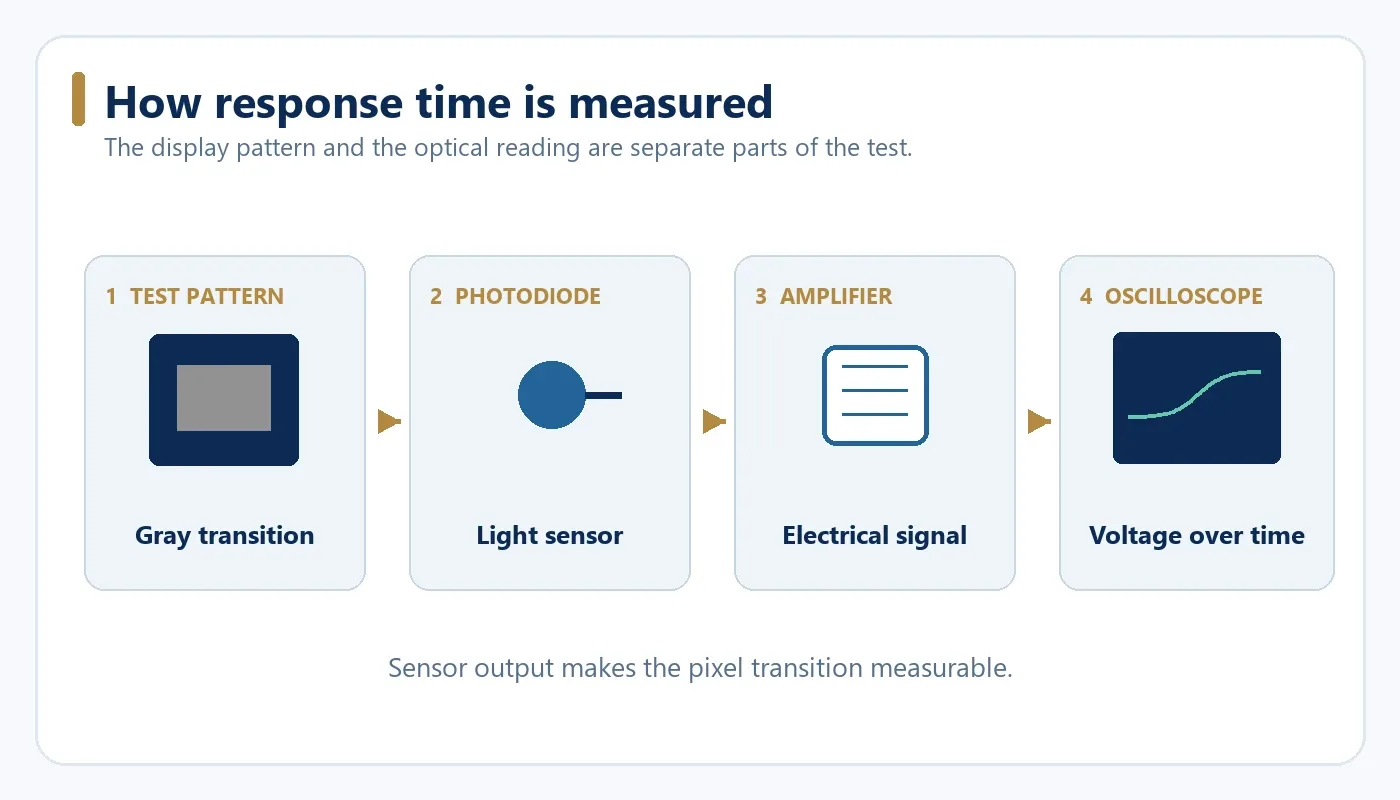
A practical monitor response time measurement system contains four main parts:
- A computer generating controlled gray transitions
- The monitor being tested
- A photodiode or other fast optical sensor
- An oscilloscope or suitable high speed acquisition system
The computer changes a test area from one gray level to another.
The photodiode detects the corresponding change in light output from the screen.
The oscilloscope records the voltage produced by the sensor.
The time between the beginning and near completion of the transition is then measured.
This provides the actual pixel transition time.
Step 1: Prepare the Monitor
Before testing, allow the monitor to warm up and reach stable operating conditions.
Keep the test configuration consistent.
Record:
- resolution
- refresh rate
- brightness
- panel mode
- Overdrive setting
Disable functions that can interfere with the optical measurement, including:
- HDR
- dynamic contrast
- automatic brightness control
- local dimming
- MPRT mode
- backlight strobing
For example:
2560 × 1440 / 180Hz / Brightness 100 / Overdrive Fast
If the monitor provides Normal, Fast and Extreme Overdrive modes, test them separately.
Otherwise the response time result has very little meaning.
Step 2: Generate Gray to Gray Transitions
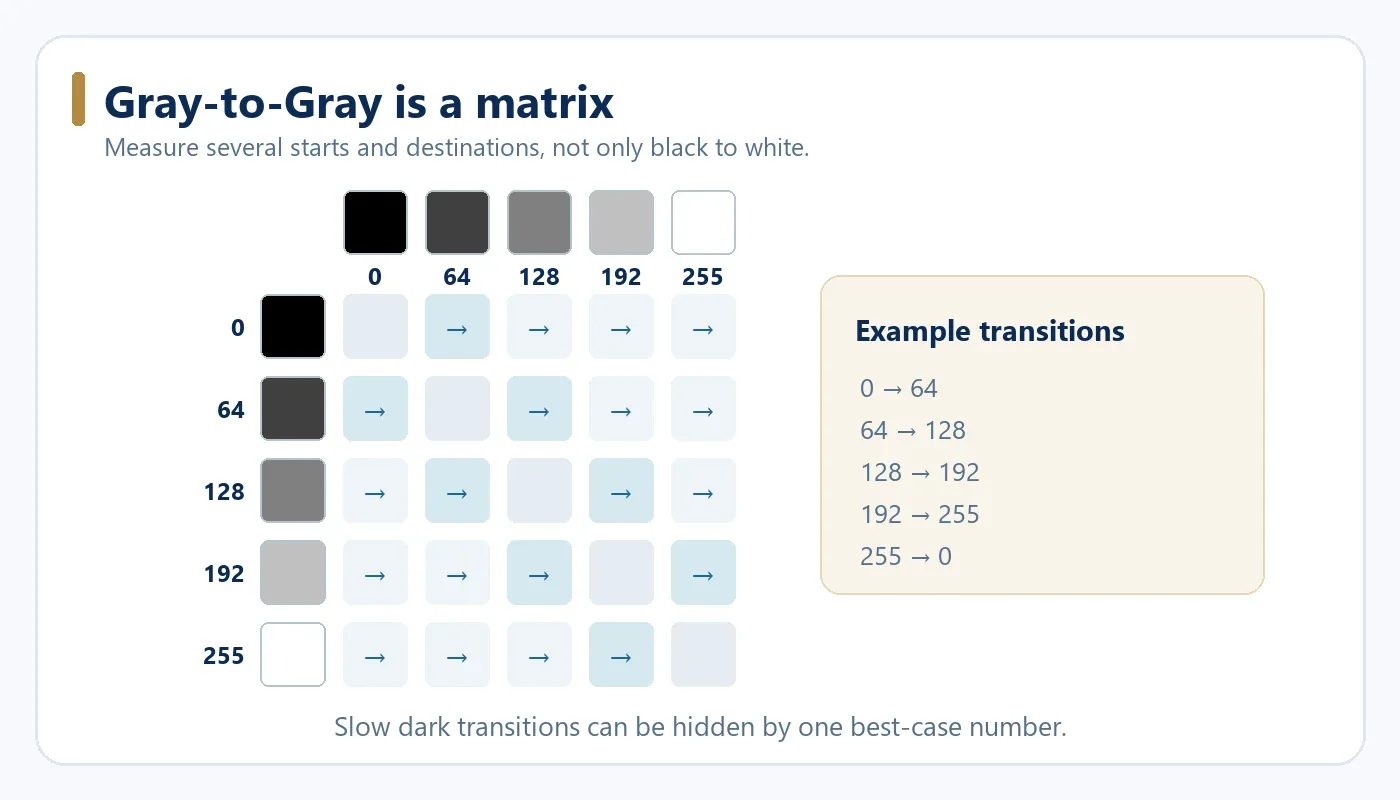
Do not test only black to white.
For a basic test, use several grayscale levels such as:
| Gray Level | RGB Value |
|---|---|
| Black | 0 |
| Dark Gray | 64 |
| Medium Gray | 128 |
| Light Gray | 192 |
| White | 255 |
Then measure transitions in both directions.
Examples include:
- 0 → 64
- 64 → 0
- 64 → 128
- 128 → 64
- 128 → 192
- 192 → 128
- 192 → 255
- 255 → 192
- 0 → 255
- 255 → 0
A more complete test can use a larger Gray to Gray matrix.
This matters because LCD response behavior depends on both the starting voltage and the target voltage of the pixel.
Some transitions can be much slower than others.
This is especially important with VA panels, where certain dark transitions may be significantly slower than brighter transitions.
A single black to white result can therefore hide poor real world performance.
Step 3: Measure the Light Change
Attach the photodiode close to the test area on the screen.
The sensor should be shielded from ambient light as much as possible.
When the gray level changes, the brightness of the pixels changes.
The photodiode converts this light change into an electrical signal.
That signal is amplified and displayed as a waveform on the oscilloscope.
The waveform shows exactly how quickly the panel moves toward the target luminance.
How Is GtG Response Time Calculated?
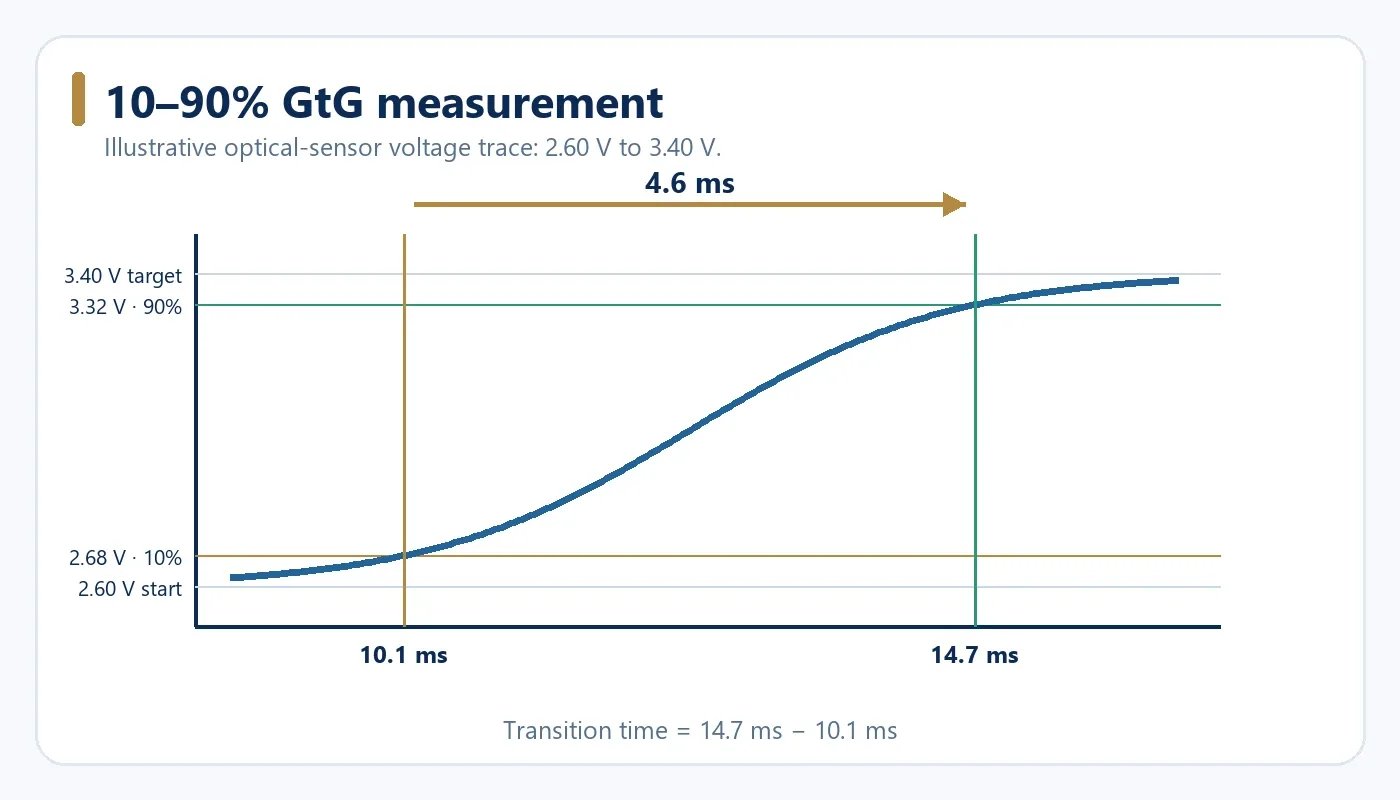
A common method measures the time between 10 percent and 90 percent of the total transition.
For example, imagine the photodiode output changes from:
2.60V to 3.40V
The total voltage change is:
3.40 − 2.60 = 0.80V
The 10 percent point is:
2.60 + 0.80 × 0.10 = 2.68V
The 90 percent point is:
2.60 + 0.80 × 0.90 = 3.32V
Now imagine the oscilloscope shows:
2.68V reached at 10.1ms
and
3.32V reached at 14.7ms
The pixel response time is:
14.7 − 10.1 = 4.6ms
That transition is therefore approximately a 5ms class transition.
It should not be described as a 1ms transition.
Why a 1ms Monitor Can Still Have Ghosting
This is where Overdrive becomes important.
LCD pixels do not always naturally transition fast enough for high refresh rate gaming.
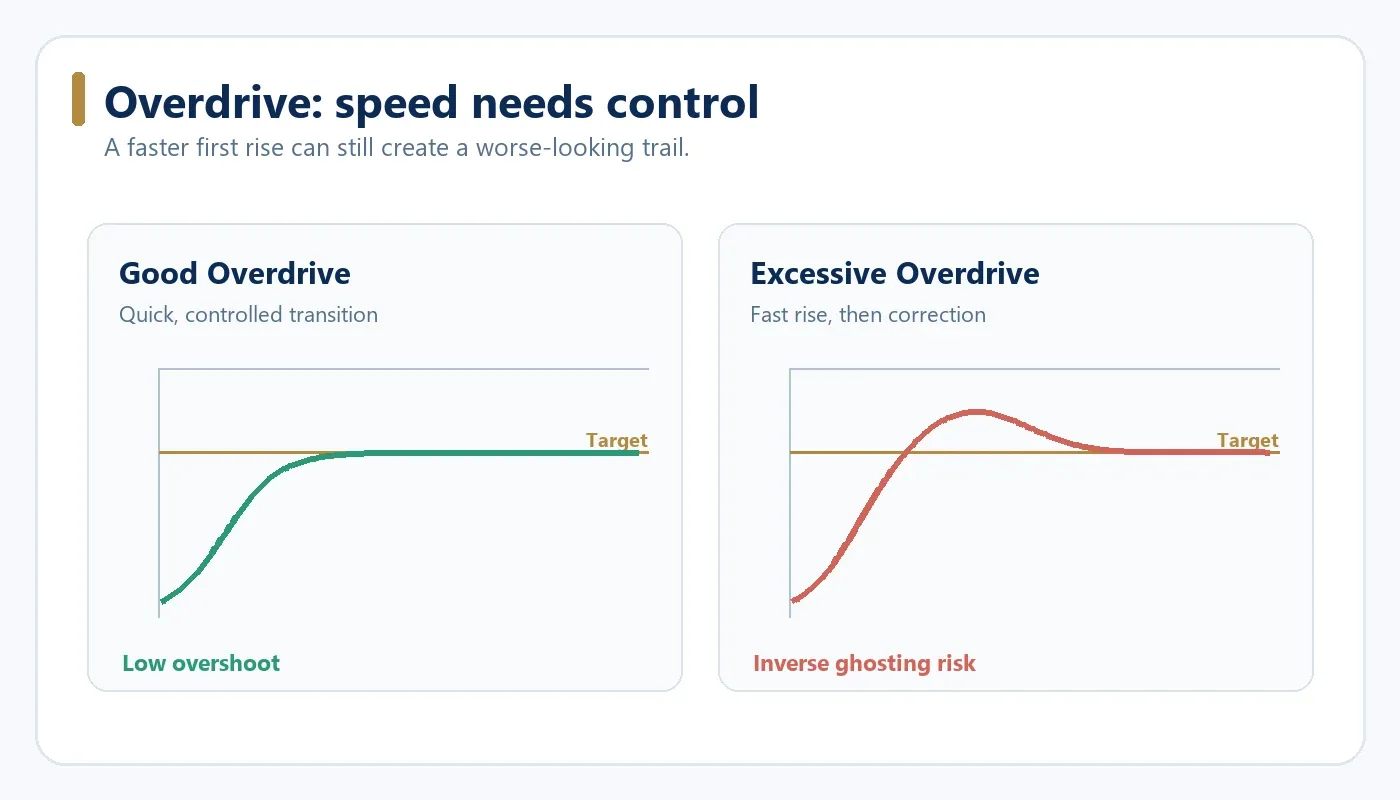
Monitor manufacturers therefore use Overdrive to apply a stronger voltage and move the pixel toward its target more quickly.
Moderate Overdrive can significantly improve response time.
Too much Overdrive causes the pixel to overshoot the target.
Imagine the target signal is 3.50V.
Instead of moving smoothly from:
2.50V → 3.50V
the pixel may behave like:
2.50V → 4.00V → 3.70V → 3.50V
The initial transition can now look extremely fast in a response time measurement.
But visually the monitor may show bright trails or inverse ghosting.
This is why an Extreme Overdrive mode can produce a result such as:
0.9ms fastest GtG
while producing worse motion quality than a slower setting.
A monitor running at:
2.5ms with low overshoot
may look much cleaner than one running at:
0.9ms with severe overshoot.
The fastest number is not automatically the best setting.
1ms vs 5ms Monitor: Does It Matter?
Sometimes.
But the answer depends heavily on refresh rate.
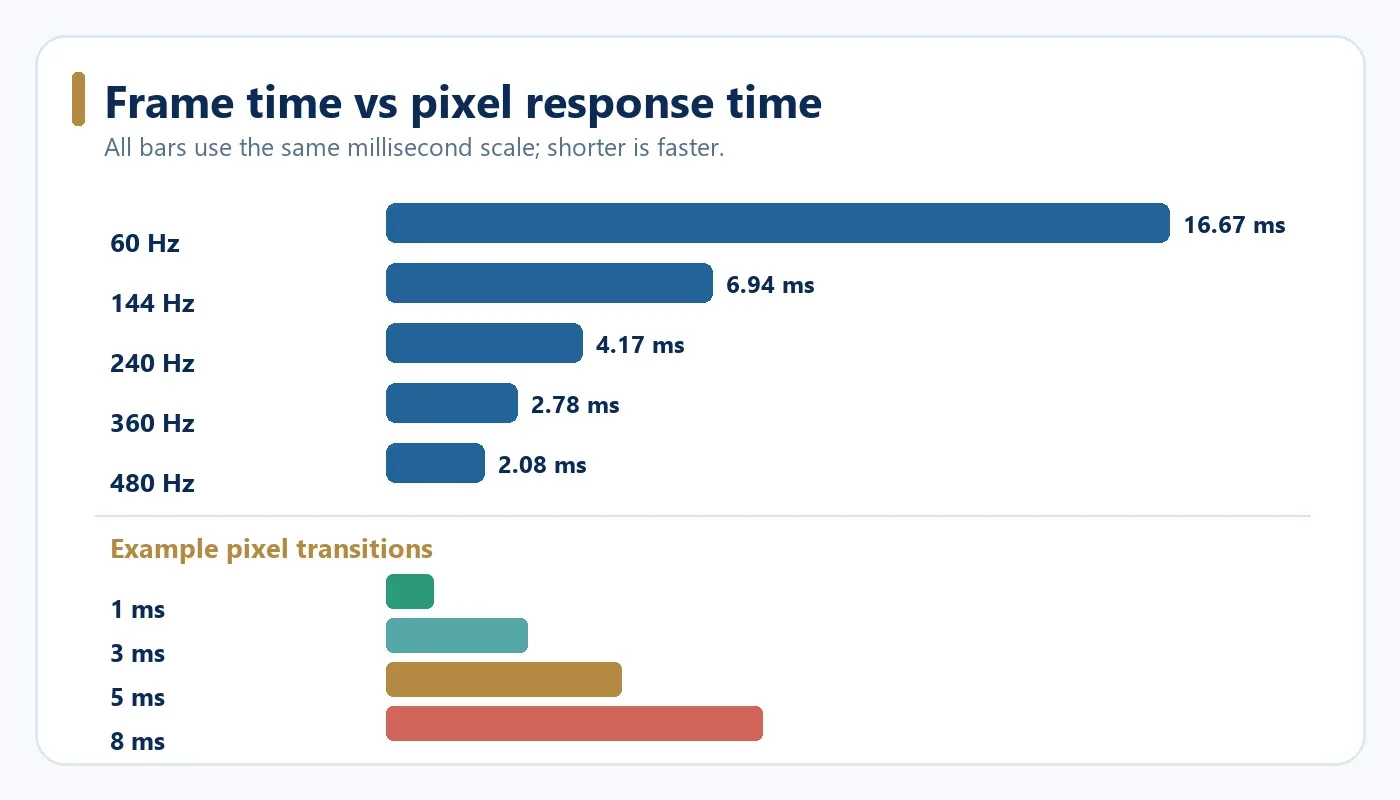
Each refresh rate gives the monitor a certain amount of time to display each frame.
| Refresh Rate | Time Per Frame |
|---|---|
| 60Hz | 16.67ms |
| 120Hz | 8.33ms |
| 144Hz | 6.94ms |
| 165Hz | 6.06ms |
| 180Hz | 5.56ms |
| 240Hz | 4.17ms |
| 360Hz | 2.78ms |
| 480Hz | 2.08ms |
At 60Hz, each frame remains on screen for approximately 16.67ms.
A 5ms pixel transition can comfortably occur inside this frame period in many situations.
At 240Hz, however, one frame lasts only about 4.17ms.
If important pixel transitions take 8ms, the pixels may still be changing when the next frame arrives.
This can increase visible smearing and reduce motion clarity.
At 360Hz and 480Hz, pixel performance becomes even more important.
But this still does not mean a monitor must show a specification of 1ms to perform well.
The relevant measurement is the actual transition behavior across many gray levels.
Is a 5ms Monitor Bad for Gaming?
No.
A properly tuned 5ms monitor can still provide a good gaming experience.
This is particularly true at lower refresh rates.
The problem is that response time specifications alone do not tell us:
- which transition produced the number
- whether the result is average or fastest
- which Overdrive mode was used
- whether overshoot was introduced
- whether dark transitions are significantly slower
For competitive high refresh rate monitors, faster average GtG performance becomes more important.
For office monitors and many normal gaming applications, 5ms can be completely acceptable.
What Should a Proper Monitor Response Time Report Include?
Instead of publishing only:
Response Time: 1ms
a useful response time test should report something closer to:
| Measurement | Example |
|---|---|
| Refresh Rate | 180Hz |
| Overdrive Mode | Fast |
| Average GtG | 3.1ms |
| Fastest GtG | 1.2ms |
| Slowest GtG | 5.4ms |
| Overshoot | Low |
This gives a much clearer picture of panel performance.
For gaming monitor OEM projects, Yanxun Display is more interested in the relationship between average response time, slow transitions, refresh rate and Overdrive tuning than a single marketing number printed on a carton.
Two panels can both be advertised as 1ms while producing noticeably different motion performance.
Why Panel Selection Matters
Response performance starts with the LCD panel.
Different panel technologies and different panel models can behave very differently.
Even monitors with the same resolution and refresh rate may not produce the same GtG performance.
This is why OEM monitor buyers should confirm the actual panel specification before approving mass production.
Panel type, timing controller settings, scaler configuration and Overdrive tuning can all affect the final result.
The response time printed in a panel or monitor specification should therefore be treated as one data point rather than the entire evaluation.
For gaming monitors, compare multiple GtG transitions and overshoot at the refresh rates buyers will actually use. For office monitors, a clean and consistent picture may matter more than a headline 1ms claim. OLED monitors need to be assessed separately: their self-emissive pixels do not use LCD liquid-crystal Overdrive in the same way. Fast pixel transitions alone also do not eliminate motion blur from image persistence or limited frame rate.
Visual Tests Still Have Value
An oscilloscope based test provides numerical data, but visual testing is still useful.
A ghosting test can quickly expose:
- dark smearing
- inverse ghosting
- poorly tuned Overdrive
- visible trails behind moving objects
A motion clarity test can also help users compare how different settings look in actual motion.
Use the Ghosting Test to look for trails at different settings, and the Refresh Rate Test to check browser frame timing. These visual browser tools do not directly measure true GtG response time.
Final Answer: Is Your Monitor Really 1ms?
There is only one reliable way to answer this question:
measure the pixel transitions.
A browser cannot accurately determine whether an LCD panel is really 1ms or 5ms.
A proper monitor response time test requires controlled gray transitions and an optical measurement device such as a photodiode connected to an oscilloscope or dedicated response time measurement system.
More importantly, do not judge a monitor by its fastest transition alone.
Look at:
- average GtG
- slowest transitions
- Overshoot
- Overdrive mode
- refresh rate
A monitor with a clean 2 to 3ms average response can provide better motion quality than a monitor that reaches 1ms only by using excessive Overdrive.
For gaming monitor design and OEM production, the quality of the complete response behavior matters more than a single specification number.
FAQ
What is monitor response time?
Monitor response time measures how quickly a display pixel changes from one level to another. LCD monitor response time is commonly measured using Gray to Gray transitions and expressed in milliseconds.
How do I test monitor response time?
For accurate measurement, display controlled Gray to Gray transitions and use a photodiode connected to an oscilloscope or dedicated measurement device to record the panel's light output change.
Can a website tell if my monitor is 1ms or 5ms?
Not accurately. A website can generate test patterns and help you visually identify ghosting, but it cannot directly measure the physical response of the LCD pixels without an optical sensor.
What does 1ms GtG mean?
It means a measured Gray to Gray pixel transition took approximately 1 millisecond under the specified testing conditions. It does not necessarily mean every pixel transition is 1ms.
Is 5ms good for gaming?
For many monitors, yes. At lower and moderate refresh rates, a well tuned 5ms response can provide good gaming performance. Higher refresh rate monitors benefit more from faster average pixel transitions.
Is 1ms always better than 5ms?
No. A 1ms result achieved with excessive Overdrive can produce visible overshoot and inverse ghosting. A slightly slower response with lower overshoot can look better in real use.
What is the difference between GtG and MPRT?
GtG measures how quickly LCD pixels change between gray levels. MPRT is related to how long moving images remain visible and is affected by refresh behavior and backlight operation.
Why does my 1ms monitor still show ghosting?
The advertised 1ms value may represent only the fastest transition. Other Gray to Gray transitions may be slower, or aggressive Overdrive may cause additional visual artifacts.
Developing a High Refresh Rate Gaming Monitor?
Yanxun Display provides OEM and ODM gaming monitor solutions with panel selection, refresh rate configuration and display tuning based on your target market and specification. Explore our gaming monitors to see current options.