
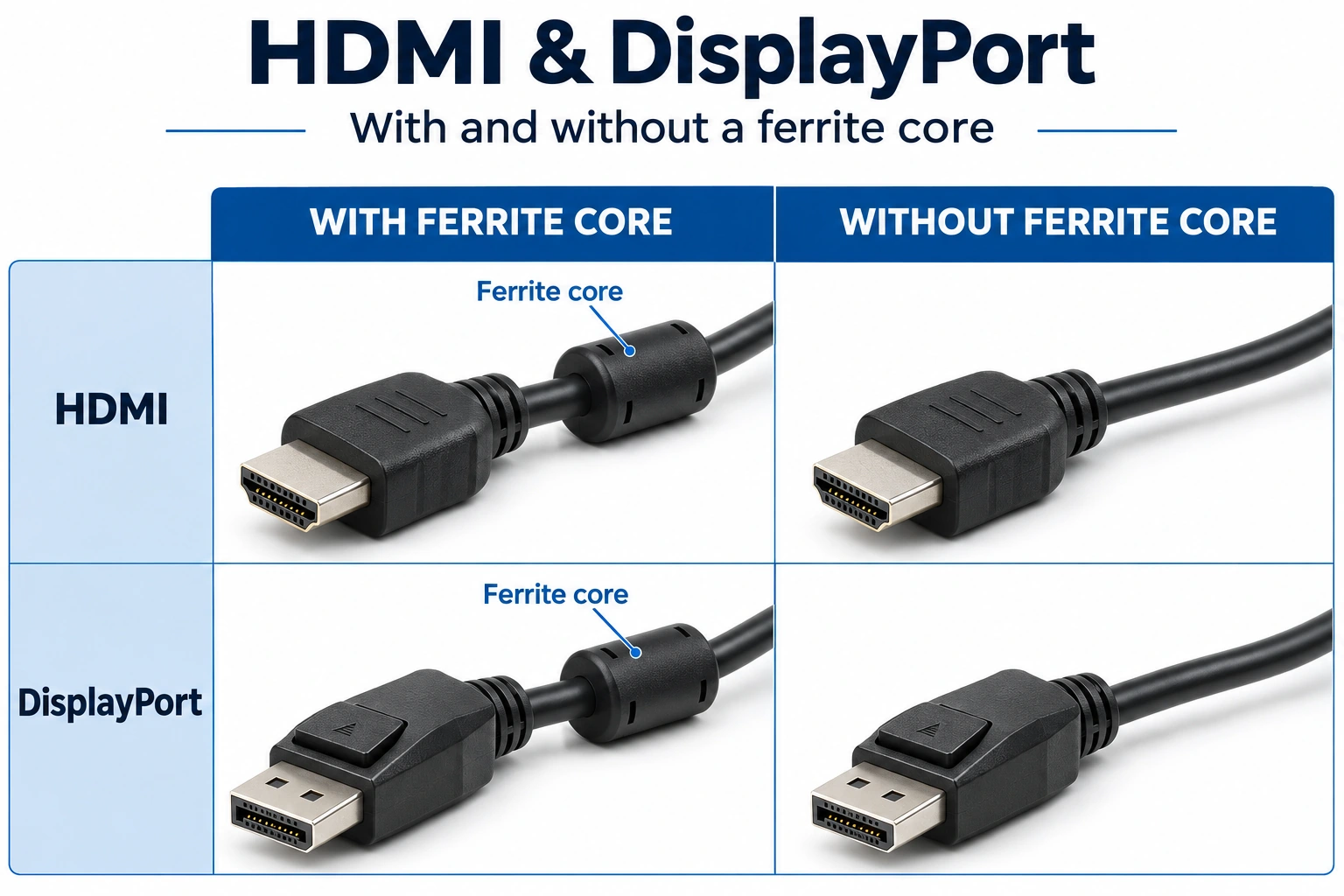
A ferrite core is a noise-control component. On an HDMI or DisplayPort cable, its job is to suppress high-frequency common-mode noise. It does not add bandwidth or sharpen a picture that is already stable. A well-made cable without a visible core can deliver a clean picture. A cable with one can still have a poor connector or the wrong speed rating.
If you are comparing the two, look at the whole connection. The ring is one part of noise control.
What is the lump on a monitor cable?
The cylinder near the plug is often a ferrite core, also called a ferrite choke. Some are built into the cable. Others come in a plastic case that snaps around it.
Video data travels through pairs of wires carrying opposite signal currents. Unwanted current can also flow in the same direction along the cable as a whole. This is called common-mode noise. A ferrite around the whole cable is designed to resist that noise while leaving the wanted data mostly alone.
The core is passive. It does not boost the video signal or add a new HDMI or DisplayPort feature.
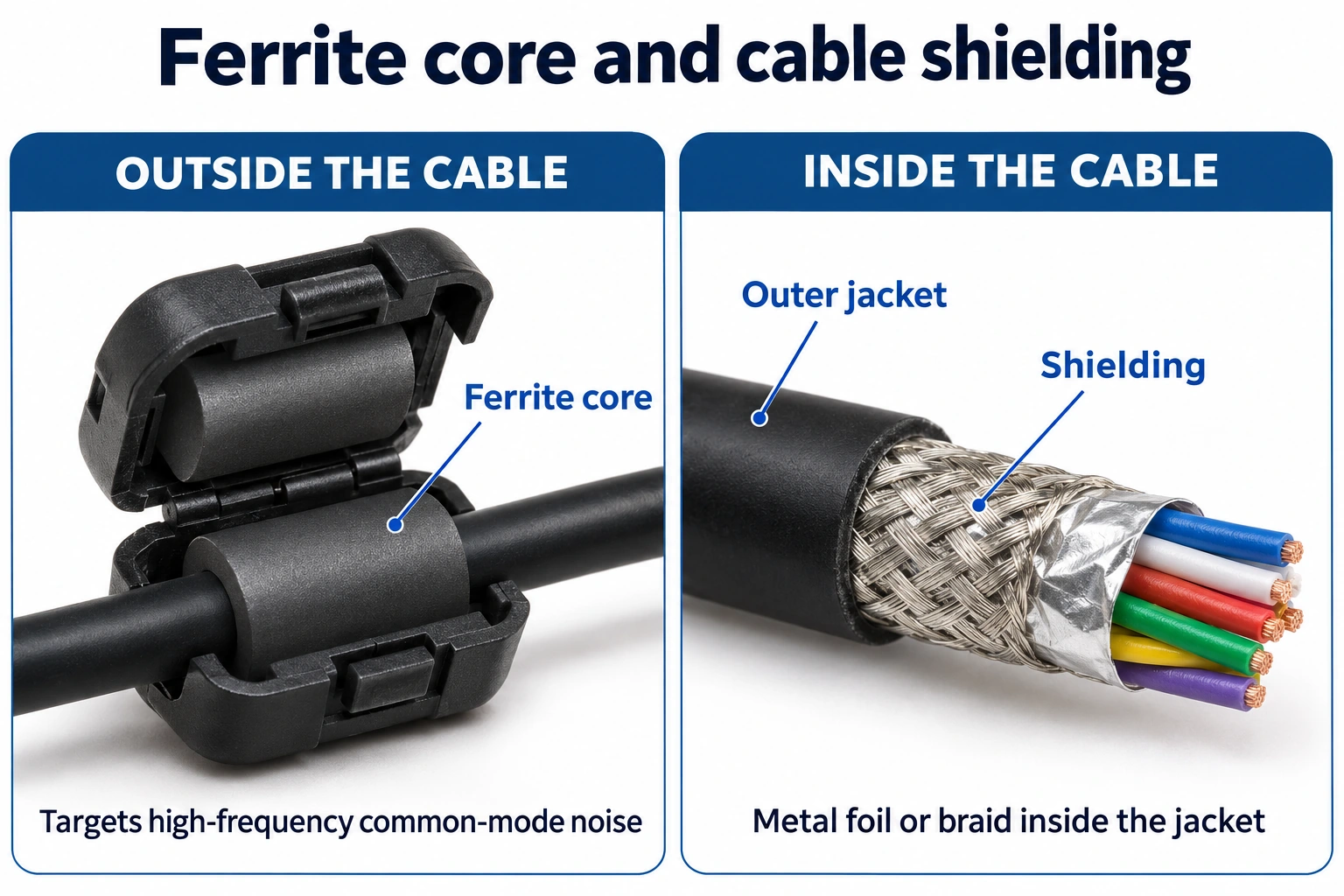
A ferrite core and cable shielding do different jobs
Foil and metal braid are shielding built inside a cable. They help limit unwanted electromagnetic coupling along it. The way that shield joins the connector also matters.
A ferrite sits around the outside and acts on unwanted high-frequency current. It cannot fill a gap in the shield or repair a badly made plug. A core and good shielding can work together.
With a core vs. without a core
| What to compare | With a ferrite core | Without a visible core |
|---|---|---|
| A stable picture | The core does not make it sharper or more colorful. | Can show the same picture at the same video settings. |
| Electrical noise | Targets common-mode noise. The core and its position must suit the setup. | Relies on the cable and equipment's other noise-control measures. |
| Resolution and refresh rate | Still limited by the ports, cable rating and selected mode. | Has those same limits. |
| Cable quality | The ring alone proves little about the rest of the cable. | The lack of a ring does not prove poor quality. |
When can a core help?
A cable can carry unwanted noise out of a device or pick it up from nearby equipment. Use a ferrite when common-mode noise is part of a repeatable problem, and select it for that noise.
The result depends on the ferrite material, its frequency response, fit and position. A large plastic case does not tell you whether those match your setup. Follow the core or equipment maker's instructions, then test.
When common-mode noise causes signal errors, a suitable core can help the connection hold its selected video mode. The core still does not change the link's rated speed.
Flicker does not automatically mean interference
A loose plug, damaged cable, unsupported setting, adapter or faulty port can also cause trouble. Video or audio errors are a reason to check the connection, not proof that a ferrite is missing.
If the picture cuts out when the plug moves, start with these loose HDMI cable checks. If lowering the refresh rate helps, check the cable and both ports against the required video mode. That result alone does not identify electrical noise as the cause.
How to compare a snap-on core fairly
Changing two different cables changes more than the core. Use the same cable and a removable snap-on core for an on-and-off comparison. Leave factory-fitted cores in place.
- Set up one repeatable test. Connect the computer directly to the monitor where possible. Secure both plugs. Record the resolution, refresh rate, HDR setting, cable route and nearby equipment.
- Observe the cable without the core. Use the same game or work task for a set time. Note each dropout or visible error. Avoid changing settings halfway through.
- Fit the core as instructed. Keep that cable, route, ports and workload unchanged. Support the core so its weight does not pull on the connector. Avoid tight bends.
- Repeat both conditions. Test with the core, remove it, and test again for the same time. One good run is not enough to judge an occasional fault.
- Compare the notes. A repeatable improvement is useful evidence for that setup. If there is no clear change, test a known-good cable or another port, changing one thing at a time.
This practical check does not certify a cable or establish a universal result for every HDMI or DP setup.
What should a monitor buyer or distributor check?
Ask for the cable's supported speed, length, connector details and relevant certification. HDMI cable certification programs include EMI requirements. For DisplayPort, check the relevant VESA certification and listed cable model.
For a gaming monitor or OLED monitor, confirm the complete connection at the intended resolution, refresh rate and color settings. Keep those settings in the test record. Make a ferrite requirement part of the specification when testing shows a real need for it.
When ordering a batch, identify the exact cable model and length. Keep a reference sample with the monitor setup used for approval. If the supplier changes the cable, connector or ferrite, run that check again before accepting the replacement. A simple "with anti-interference ring" line on a purchase order is not a complete cable specification.
Quick Q&A
Do HDMI and DP cables need a ferrite core?
There is no universal requirement for a visible core. A well-designed cable can meet its requirements without one. Judge the complete cable and its performance in the intended setup.
Will a ferrite core unlock 4K or 240Hz?
No. The computer's output, monitor input, cable capability and video settings determine the available mode. A core does not upgrade any of those.
Can I add a snap-on core to my existing cable?
Yes, if it fits properly and is suitable for the noise you are addressing. Follow its maker's instructions. Do not crush the cable jacket or pull the plug sideways.
Which end of the cable should it go on?
Follow the equipment or core maker's guidance. The best position depends on the noise path. Test one position at a time; neither the PC end nor the monitor end is always the answer.
Does a core fix every flicker or black screen?
No. Check the plugs, supported settings, cable, adapters and ports first. Try another signal source if needed. A flicker can have several causes.
Should distributors always buy cables with cores?
No. Specify the required video mode, cable length and certification first. Then compare complete cable samples. Add a ferrite requirement when testing shows a clear need for it.